
5 minutes
How Two Browsers Connect With WebRTC
Four browsers sit at one poker table. None of them can reach the others yet. The words peer-to-peer make it sound simple, like two tabs calling each other on the phone. But the browser on your laptop and the browser on a friend's phone each sit behind a router. That router hands out a private address, and the public internet can't reach a private address. So before a card can travel between them, the two browsers have to find each other, and neither can do it alone.
WebRTC solves this with a short, fixed introduction. The diagram below shows every step of it.
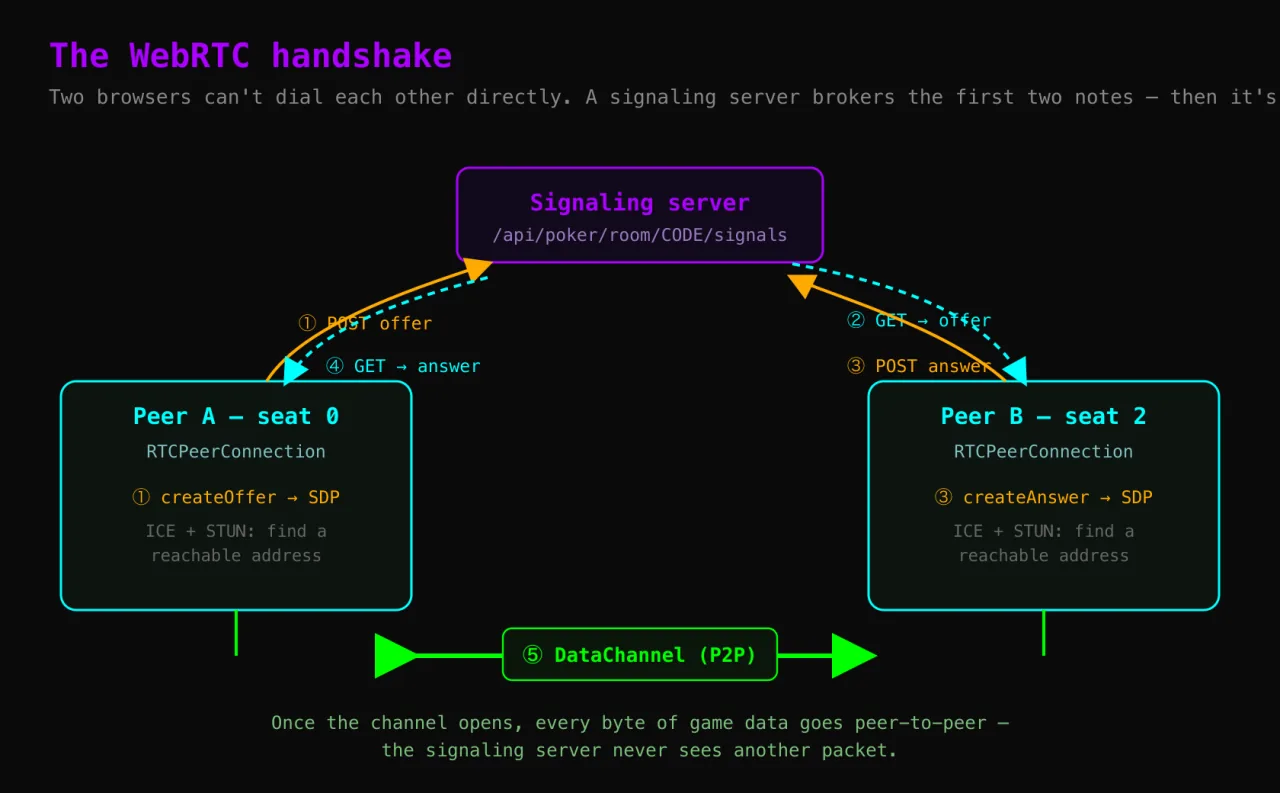
How two browsers actually connect
It starts with an RTCPeerConnection on each side: a built-in browser object that owns one direct link to another peer, gathering addresses, setting up encryption, and carrying the traffic. Together the two form the ends of the line we are about to draw.
The first browser writes an offer: an SDP blob, plain text saying how to talk to this browser — the codecs it supports, its encryption fingerprints, and the addresses where it can be reached. The second browser sends back an answer, the same kind of description from its own side. One offer out, one answer back is the whole negotiation, and once each peer holds the other's description both know how to build the link.
Continue reading
Unlock the Full Course
Every lesson, the runnable examples, and the finished build — yours to keep.