
5 minutes
Line of Sight and Health
The robot from last lesson stands in the arena, looping its idle clip and casting a shadow. It looks right and does nothing: walk up to its face and it doesn't react, shoot it and it doesn't flinch. It has a body and an animation but no senses and no stakes — the two things that turn a prop into an enemy.
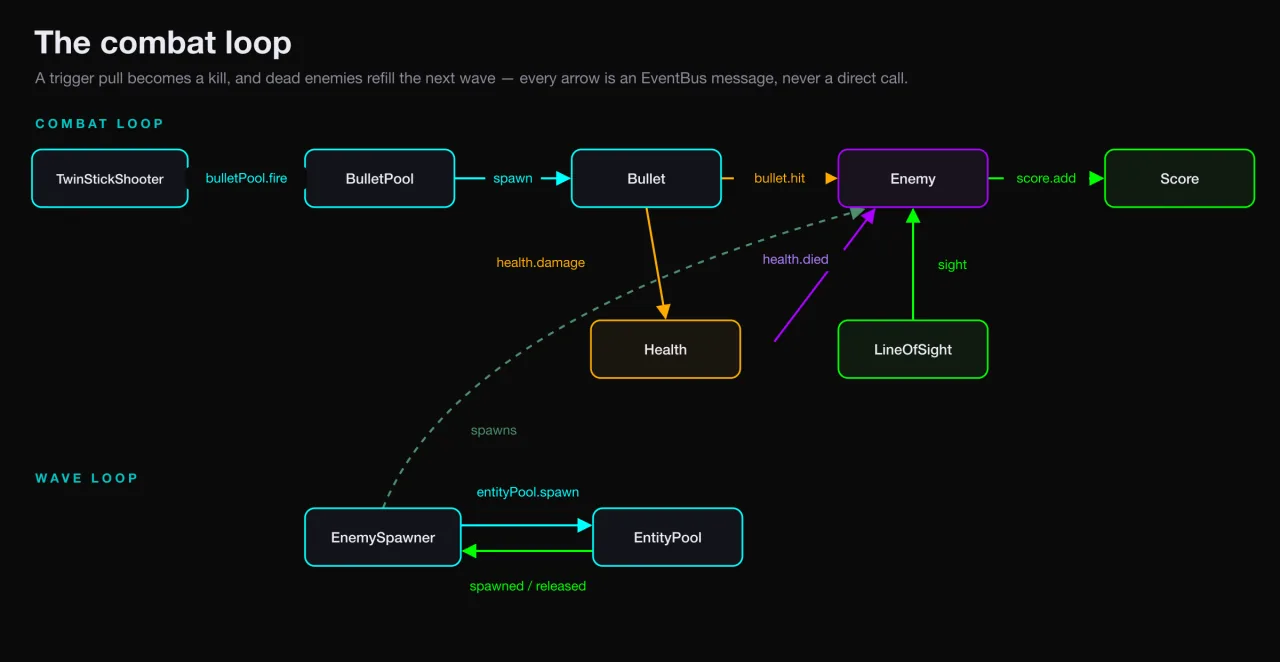
Add LineOfSight and Health to the enemy template
You keep the enemy template from last lesson and add two components. LineOfSight lets it see the player. Health lets two bullets bring it down:
LineOfSight brings a new System with it, but this time there's nothing extra to wire. You dropped it into the enemy's pool blueprint, and that blueprint is a real scene entity — SceneLoader sees a live LineOfSight sitting on it and builds LineOfSightSystem to match. It's the same scene-keyed path that brought MeshSystem, SkeletonAnimatorSystem, and TwinStickEnemySystem online in Lesson 5: put a component in the blueprint and its System comes free with it, no marker stub required.
Health is the same story, only easier. Its system already came in with the player, which has carried Health at the top level since Lesson 2. Both new senses register themselves the moment the scene loads.
Continue reading
Unlock the Full Course
Every lesson, the runnable examples, and the finished build — yours to keep.