
9 minutes
Writing Components and Systems
TL;DR — Build Asteroids-style drift from two plain-data components and two systems. You'll learn which fields belong on the component and which belong on the system. New here: the split between data and behavior, and the one
onUpdate(dt)every system must have. The rest of the course builds on both.
In the last lesson you got the smallest ECS loop running. It had a Position component, a MoveSystem, and one entity sliding steadily to the right. That slide is the start of a whole game. Asteroids feels like Asteroids because of drift. You tap thrust once, and three seconds later you're still fighting that momentum. You slide right past the rock you meant to shoot. Now you'll build that drift for real, using two components and two systems. You'll also meet a trap that costs everyone an afternoon. If you write a component's lifecycle hookA method the framework calls for you at a specific moment - when something is created, removed, or updated - so you can run code at that moment without polling. on a system, the code looks right. The computer never complains. But the thing silently never happens, and there's no error to search for.
A component is plain data with defaulted fields
Here's Spin. It says one thing: this entity rotates, and how fast.
New to this syntax? Here's a quick tour. A class is a blueprint for an object. extends Component means it builds on the framework's base Component classA blueprint for an object: it names the fields the object holds and the methods it can run. `new SpinComponent(...)` builds one object from the blueprint.. The constructor is the setup that runs when you write new SpinComponent(...). And super() runs that base class's setup first. The interface above names which fields the input can carry.
Copy that constructorThe function that runs when you create an object, setting up its starting fields from the values you pass in. shape exactly. One plain-data object goes in, and every fieldA named slot for a value inside an object, like `speed` or `axis`; a component is mostly a bag of fields. has a default set with ??. Now new SpinComponent({ speed: 3 }) works. new SpinComponent() works too. And three lessons from now, scene JSONPlain text data made of curly-brace key/value pairs, like `{ "speed": 3 }`; the format scenes are saved in. `JSON.stringify` turns an object into that text. like "Spin": { "speed": 3 } will deserializeThe reverse of serialize: rebuild a live object from the plain data it was saved as. straight into the same constructor. The ?? means "the value, or this fallback when it's missing." So a scene that only fills in some fields still boots. The {Name}Component suffix isn't for looks. The scene loader finds components by that name, so matching it is what lets the framework find your class later.
This pattern isn't only for your own code. Here is KeyboardMover, a published component from the arcade library. It has the identical shape:
Same Input interfaceA TypeScript shape that names the fields a value must have, used here to type a component's constructor input., same defaulted constructor, same suffix. The only extra is serialize(). It's worth knowing exactly what it does and doesn't do.
Because the component stays plain data, the base Component class already gives you a clone() and a toJSON(). Scene saving runs toJSON(). It dumps every field except the internal entityId and eventBus. So KeyboardMover already round-trips to its { speed, faceMotion } on its own. The serialize() method here is a separate convention. The package's contract test round-trips through the constructor with it. It is not the scene-save hook. To change what a saved scene writes, override toJSON(), not serialize(). None of this survives if you put something non-savable on the component. A live object can't be cloned or turned into JSON. We'll come back to that, because it's the rule that decides where data lives.
Notice what's not in either class: no update method, no math, no mesh. A component holds the numbers. It doesn't do anything with them.
It does have two lifecycle hooks. Most data components leave them empty:
onAttachOverride() fires after the component lands on an entity. The event busThe framework's shared messaging channel: systems and components publish events to it and subscribe to events from it instead of calling each other directly. Covered in lesson 4. is connected by then. onDetachOverride() fires when it's removed. These two hooks exist only on Component. Write onAttachOverride on a system and TypeScript accepts it, since it's a valid method name on any class. The framework never calls it, because a system has different hooks. The base class catches that mix-up and warns you on the console. Systems get their own lifecycle, which you'll see in a moment.
The system that does the spinning
Rotation and Velocity follow the same recipe as Spin. Rotation is three angles in radians, one per axis (x, y, z), because a thing in 3D can turn three separate ways. Velocity is x, y, z plus a drag field. A web app sleeps until an event fires. A game is different. It runs a nonstop loop that redraws the screen many times a second. The world drives that loop. It calls every system's onUpdate(dt) once per redraw and hands it dt, the seconds that passed since the last frame. So in the loop below, dt is that per-frame slice of time:
Three rules hold for every system you'll write.
The constructor's only job is to set this.query. It runs once, before the system has seen a single entity. It declares which entities this system cares about. The event bus isn't wired here. world.addSystem injects it (via setWorld) when you register the system. The query above asks for entities that have both a Spin and a Rotation.
onUpdate(dt) is the one method you must implement. It's marked abstract on the base class, so TypeScript won't let you build a system without it:
Multiplying every change by dt, as in spin.speed * dt, keeps the ship rotating at the same real-world rate. That's true whether the machine renders 30 or 144 frames a second. A slower frame has a bigger dt, so each step covers more ground, and the totals stay equal.
this.entities arrives pre-filtered. It already holds exactly the entities that match the query, and nothing else. That's what makes entity.get(SpinComponent)! safe. In general, get returns T | undefined. But inside this loop the query has already guaranteed the component is there. So the ! states a fact the framework enforced. One catch is worth naming. this.entities is a Set, not an array. An array is an ordered, numbered list you can index into. You step through a Set with for...of, but you can't call .find() on it. To fetch a specific entity by id, ask the world with this.world?.getEntity(id).
How an entity reaches a system
Queries don't run once at startup. Every time an entity gains or loses a component, the world checks that entity against every system's query again. That's how an entity slides into the right systems the moment it's built, and out again the moment its parts change. The five-field query behind all of this gets its own lesson next. For now, a system never loops over the whole world. It loops over the set the framework already filtered down for it.
A system also has its own lifecycle hooks. They use different names from the component's two, and the compiler won't stop you from mixing them up. Two pairs matter. onInitialize() and onShutdown() bracket the system's own life. onInitialize runs once when the system is added to the world. That's the place to subscribe to eventsTo register a callback that the event bus runs whenever a named event is published. Inside a System you do this with `this.listen()`.. Inside a System you subscribe with this.listen(), not eventBus.on, so the cleanup is automatic. (The next lesson covers this.) onShutdown runs once when the system is removed. That's the place to release anything you grabbed by hand. The other pair is onEntityAdded(entity) and onEntityRemoved(entity). These fire as entities enter and leave this system's set. Membership can change long after an entity was first created. The next lesson lives in those membership hooks. Here it's enough to know the two sets of names don't mix.
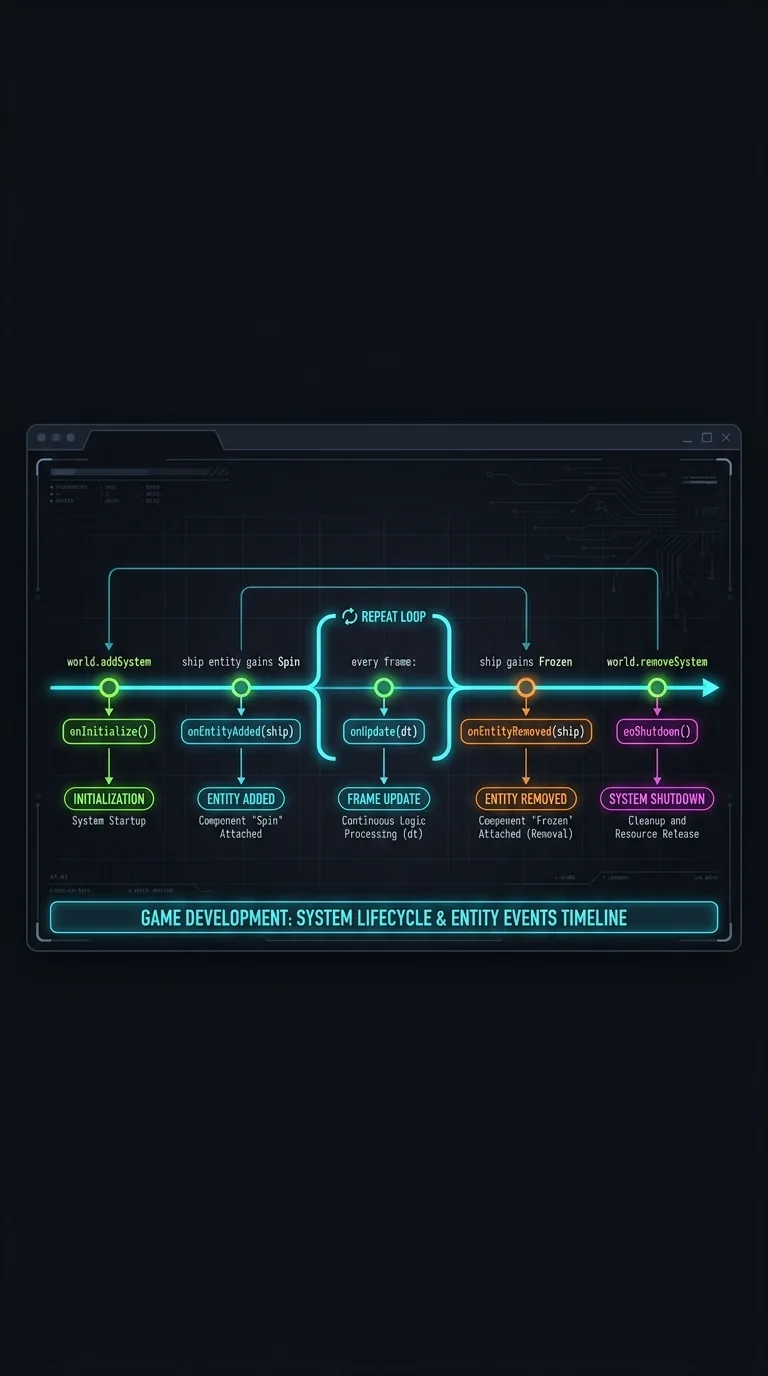
So the two classes carry two separate sets of hooks:
| Class | Lifecycle hooks |
|---|---|
| Component | onAttachOverride / onDetachOverride |
| System | onInitialize / onShutdown, plus onEntityAdded / onEntityRemoved |
Put onAttachOverride on a system, or onUpdate on a component, and you've written a method nothing calls. TypeScript is happy either way, so the two classes check each other's hook names instead. Build one carrying the wrong ones and it prints:
Once per class, not once per instance, so spawning a hundred bullets doesn't bury the console. The fix is always the same: match the hook to the class.
What data belongs on a component versus a system
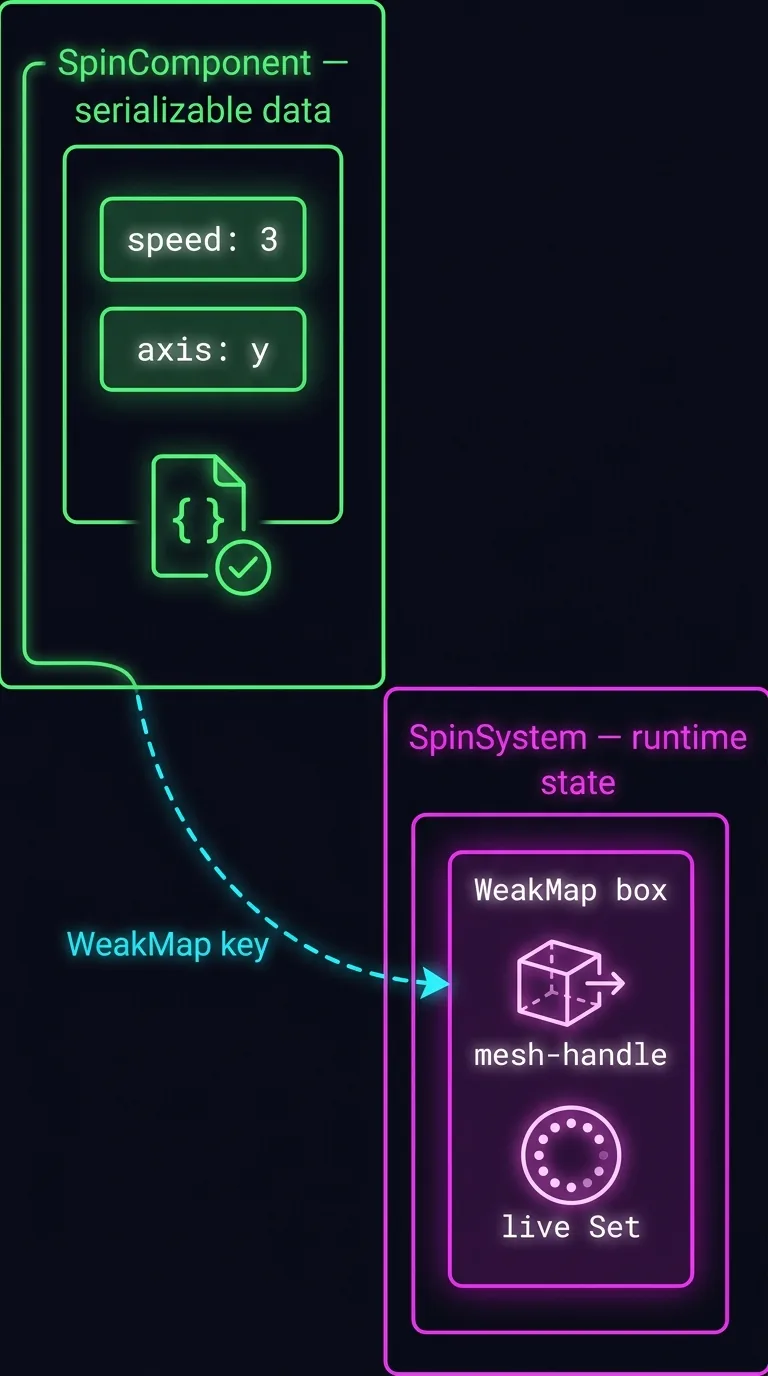
Sooner or later SpinSystem will want to hold a handle to the mesh it rotates, so it doesn't have to look the mesh up every frame. The tempting move is to stash it on the component:
This quietly breaks everything plain data gave you. Now clone() copies a referenceA pointer to the SAME object, not a fresh copy; copy a reference and both names share one object, so changing it through either name changes both.. That's a pointer to the SAME Set, not a fresh copy. So two cloned entities share one collection, and changing it through one changes both. The mesh handleAn opaque reference to a renderer object (a 3D model the engine drew) that a system holds but a component must never store. isn't data either. It's a pointer into the rendererThe layer that draws the 3D scene on screen (Babylon.js or Three.js here); a system reaches it through an adapter, and its live objects can't be saved as data.. So the scene can't be saved and reloaded cleanly. A saved scene comes back with garbage where the ship's spin used to be. The test is one line: if a field wouldn't survive JSON.stringify, it doesn't belong on a component.
| Belongs on the component | Belongs on the system |
|---|---|
Tuning numbers (speed, drag) | Mesh / camera / light handles |
Strings, booleans, enums (axis: 'y') | Sets of live entity ids |
| Small frame-cache values (a cooldown timer, last facing) | One-shot init flags |
Anything that survives JSON.stringify | Anything with methods or live references |
Runtime state belongs to the system, keyed by the component it goes with:
A WeakMap keyed on the component instance keeps the runtime entry alive for exactly as long as the component lives. When the component is garbage-collected, its entry goes with it. You write no cleanup code. The component stays a clean bag of numbers that serializes and clones. The system owns everything that's alive.
The movement system, and the drift
The second system gives Asteroids its slide:
That decay line gives the game its whole feel. Each frame, you keep the fraction 1 - vel.drag * dt of your velocity. Math.max(0, ...) floors that fraction at zero, so a large drag can't go negative and fling the ship backwards. With drag: 0, the fraction is 1, velocity never fades, and the ship coasts forever. That's true Asteroids. Turn drag up and the ship slows on its own, more like a car. Either way, the system never knows what kind of entity it's moving. It reads Position and Velocity off whatever matched its query and pushes the numbers around.
Priority, enabled, and pauseable on every system
Three system behaviors you set instead of writing them yourself:
| Knob | Default | What it controls |
|---|---|---|
priority | 0 | Run order within a frame — higher runs first, negatives run late |
enabled | true | The kill switch — false skips onUpdate, keeps the entity set intact |
pauseable | true | Whether world.pause() freezes this system's onUpdate |
Reach for priority only when two systems write the same data in one frame and the order shows on screen. pauseable is the trick behind a pause menu. A menu UI system sets pauseable = false, so it keeps responding to input while world.pause() freezes every gameplay system. The asteroids hang still, mid-drift, behind the menu.
How a shipped component is laid out
Spin fits in one file because it is two dozen lines. A component you download from the marketplace is bigger, and it splits along the lines this lesson has been drawing. Here is KeyboardMover again, as it actually ships:
The split that matters is the first two lines, and it exists for one reason. A system that wants to act on a moving character has to name the class in its query:
Naming a class means importing it. If the class lived beside the system, that import would drag KeyboardMoverSystem in too — every frame of keyboard handling, for a system that only wanted to know which entities can move. Worse, you couldn't download one component without also downloading a neighbour it never runs.
So the class lives in KeyboardMover.defs.ts — the file you read at the top of this lesson, which imports Component and nothing else. The system, the key handling and the per-frame math all sit next door in KeyboardMover.ts.
One rule follows: when you reach for another component, import from its .defs.
Both compile. The second one works today and quietly costs you a dependency you never wanted, which is why a lint rule catches it: prefer-sibling-defs-import flags the import and rewrites the path for you.
Two more files show up in bigger bundles. {Name}.core.ts holds pure logic — createMovement, stepYaw — math with no ECS and no renderer in it, so it can be tested on its own. And adapter/ appears when a component needs something the renderer interface doesn't offer yet; the last lesson comes back to that.
Building the ship
Now let's put it all together. world is the one you met last lesson. Entity methods chain, so building one reads like a spec sheet:
Each .add(...) re-checks the ship against every system's query. So by the last line, the ship sits in both SpinSystem's set and MoveSystem's. From here, thrust pushes on Velocity, drag bleeds it back off, and Spin keeps the hull turning. That's three components and two loops, all talking through plain data.
You still can't see the ship, because it has no mesh. Every behavior here ran on numbers alone. That's exactly why the systems were so easy to follow, and would be so easy to test. The hull arrives from the arcade library two lessons from now, when scenes become JSON.
That's a complete mechanic you can reuse. But these two systems keep to themselves. They only ever touch their own entities' data. A real game needs the collision system to tell the score system that something exploded, without either one importing the other. The next lesson shows how a system finds the entities it acts on, with zero per-frame filtering. It ends with one surprising trick: a freeze ray that stops a ship without a single if.
Next: The Five Filters: How a System Finds Its Entities — the full five-field query, live queries that re-match on every change, and the membership hooks that fire as entities enter and leave a system.