
6 minutes
Download Assets and Components
TL;DR —
bjs download <asset-key>saves a marketplace assetA binary game resource — a 3D model, texture, audio clip, or a zipped pack of them — that your game loads at runtime. to disk. It can be a.glbmodel or a zipped pack. First the command asks the server for a signed token. That token expires in seconds, so the command fetches the file right away, before the token runs out. The same command takes a component name too: when a key matches no asset, it acquires that component with cheddar and lands its source in your project.
Last lesson you browsed the catalog in the BBS. You came away with a short list of names, but nothing on disk yet. This lesson turns one of those names into a file, as long as the name points to an asset. Your scaffolded game has a player, a camera, and a floor. Right now each one is a grey capsule or a flat plane. To make it look like a real game, you need real art: a spaceship model, a city block, a texture pack. That art lives in the marketplace, and one command lands it on disk:
Watch the spinnerAn animated terminal indicator that shows a long-running command is still working and reports its progress text. closely the first time and you'll notice something odd. The command doesn't reach into your account and stream the file straight down. It makes two separate requests, one after the other. The first asks may I have this? and gets back a signed link that expires in seconds. The second uses that link, right away, to pull the bytes down. That back-to-back pair is what the rest of this lesson means by the two requests.
One argument, two kinds of thing. The key you hand it can name an asset — that .glb, the standard one-file 3D-model format — or it can name a component, in which case the command buys the component and writes its source into your project instead.
The key and what download checks first
The argument is a <slug>, like spaceship-fighter, city-buildings, or ArcCamera — the same key you saw on a row in the catalog browser. It is not a file path.
Before fetching anything, the command checks two things. First, that you're logged in; if you aren't, it sends you to bjs login, and the session from Lesson 1 is what unlocks every download. Second, that it knows which project to write into. Downloads land inside a scaffolded project, so download needs one nominated. You set a default once with bjs use <path>, override it per-command with --project <path>, or pick one in the BBS. With no project set, the command stops and tells you so before it touches the network.
Why the download takes two requests
Getting the file takes two requests, not one.
The first request asks the server for permission, signed with your session. The server doesn't send back the file. It sends back three things: the file's name, a download URL, and a countdown — how many seconds that URL will keep working. It's signed, and it works for only those few seconds. The second request runs right after and fetches the file from that URL.
That split is what keeps the download both fast and yours. The signed URLA file URL carrying a server signature that proves the request is authorized and can't be tampered with or replayed. already proves the request was allowed, so the file transfer carries no credentials of yours at all. Its protection is the clock: the signature stops verifying seconds after it's issued, which makes a leaked link worthless before anyone could use it. And the permission request is rate-limited — ask too fast and it comes back 429, the command tells you you've been rate limited, and it never reaches the file.
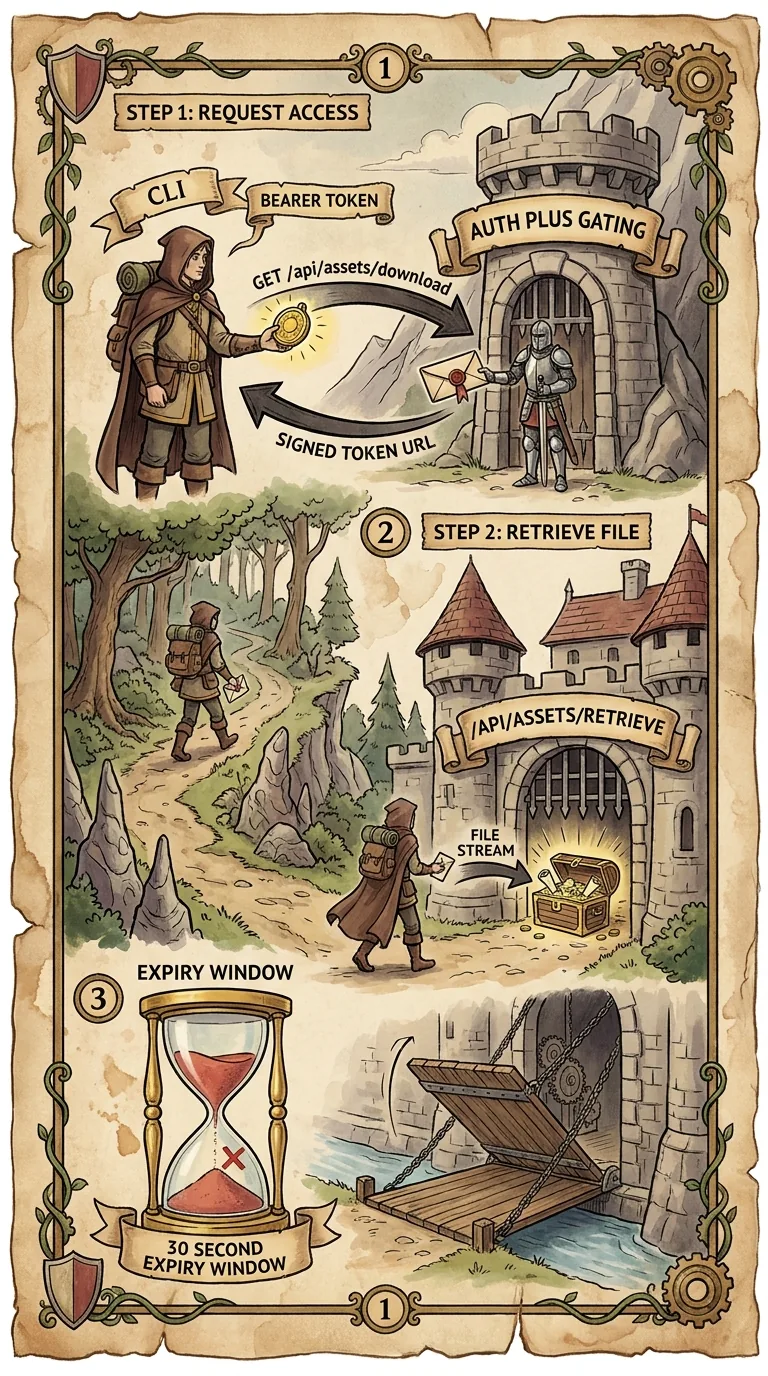
The countdown is why you can't "save the link and download later." By the time you paste it, it has expired. That's why the command asks for the token and fetches the file back to back.
Choosing the output folder and reading progress
Once the second request has the file streaming, the command picks where to put it, makes the folder if needed, and writes the bytes down while it reports progress.
The output directoryThe folder a downloaded file is written to — the current directory by default, or whatever -o names. is whatever you passed to -o. If you didn't pass one, the file goes to your target projectThe scaffolded project a download writes into, set once with bjs use <path> and overridable per-command with --project.'s asset pathThe subfolder of the target project that downloaded assets land in — public/ unless you change it. — public/ unless you've changed it — which is where the engine already looks. If that folder doesn't exist yet, the command builds the whole path for you, every missing parent included, so you don't need to mkdir first. A zipped pack is extracted there rather than left zipped, and a single file keeps the name the server chose, so you don't have to guess the extension.
The progress number is real, not just for show. The server sends a content-length header, which is the total byte count. The command adds up each chunk as it arrives and turns that ratio into the percentage the spinner shows. When the size is known, you see Downloading spaceship-fighter.glb: 42% climbing to 100. When it isn't, the spinner just spins. Either way, it ends on one green line that tells you the file and exactly where it went.
In practice, that's two choices about the flag. With no flag, the file drops into the project's public/. With -o, it goes exactly where you say:
Run one of these and the spinner walks through the whole flow:
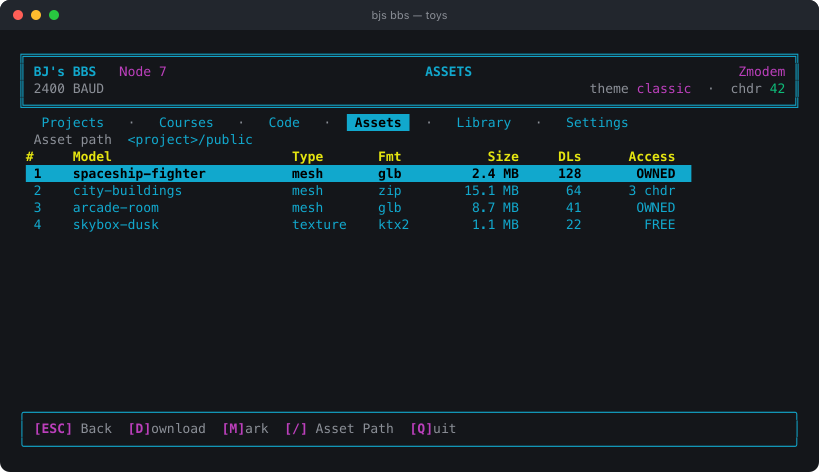
It's worth checking a 15 MB pack before you pull it. The catalog row shows the file type and size next to the key, so you know if you're fetching a 200 KB prop or a whole city. If the very first line fails with a login message, your session ran out since Lesson 1. Run bjs login to restore it.
Not every pull is free or open. A paid asset costs cheddar the first time you get it, though re-downloads are free after that. An asset tied to a course needs you to own that course. So the token request can come back not only as a 429, but as "not enough cheddar" or "access denied." That's a wall to clear on the website, not a bug in the command.
When the key names a component instead
Everything so far assumed the key matched an asset. Try a name the asset side has never heard of:
The first request — the one that asks for a download tokenA short-lived, HMAC-signed credential the server issues so the client can fetch one specific file before it expires seconds later. — comes back 404. No asset is filed under that key. Rather than stop there, the command re-reads the key as a component name, and the whole second half of the marketplace opens up. ArcCamera becomes the catalog path Components/ArcCamera, and the command acquires it: your cheddar is drawn down, the component is unlocked for your account, and its source is written into your project's src/Components/.
So one command covers both halves of the catalog, and which branch you get is decided by what the key turns out to name — not by a flag you set:
| The key names | Where it lands | What it costs |
|---|---|---|
An asset (.glb, texture, zipped pack) | the project's public/ | free, or cheddar for a paid asset |
A catalog component (ArcCamera, Homing) | the project's src/Components/ | cheddar, plus its dependency components |
On the component branch, if your balance can't cover it, the command reports what you needed against what you have and exits without creating a file. And if the component declares a minimum @babylonjsmarket/ecs version that your project doesn't meet, it says so and stops rather than installing source your project can't compile.
There's a third form worth knowing, because it saves a lot of typing. bjs download scene <name> pulls a component's runnable example scene, and its flags pull the rest of what the scene needs:
--components acquires the components the scene references, --assets fetches the models and textures it loads, and --all does both, so a scene arrives able to actually run.
What download never does is copy source out of a package you already installed. That is a different job with a different cost — offline and free instead of networked and paid — and it belongs to a different tool. The next lesson is that tool.
Next: Get Component Source: Eject and Acquire — arcade eject copies the package's own built-in components into your code, offline and free, and pulls their whole dependency closure along.