
9 minutes
Get Component Source: Eject and Acquire
TL;DR — Two ways a componentA reusable chunk of game behavior — like "can take damage" (Health) or "is a bullet" (Bullet). Arcade games are assembled from them.'s source lands in
src/as code you own.arcade eject <Name>copies a built-in and its whole dependency closureThe full set you get when you start from a component and keep pulling in everything it needs, and everything those need, until nothing is left out. out ofnode_modules; it runs offline and free.acquireunlocks a catalog component for creditsThe marketplace's in-account currency, spent to acquire catalog components and earned when your own submissions merge.. New here: how ejectCopy the arcade package's own built-in component source out of node_modules and into your src/, where it becomes code you own and can edit. walks the dependency closure, and why your local copy overrides the package's built-in. The marketplace-ready and inject lessons both build on it.
The last lesson stopped at a line bjs download won't cross. That command moves assets, like a .glb or a texture pack. It never moves a component's source. This lesson moves that source. A component is a reusable chunk of game behavior. "Can take damage" is one (Health). "Is a bullet" is another (Bullet). You run arcade eject Bullet to pull one into your project. When it finishes, your src/components/ folder holds four: Bullet, Health, MeshPrimitive, and Obstacle. You named one. The other three came along on their own. They are already copied and already wired, and their imports were rewritten so every reference still resolves. Then you change a default in your copy and reload the game. Now your Bullet runs instead of the package's, and you never touched any config.
Two things happened that the command never announced. First, it followed the chain of things Bullet needs. That is how "Bullet" turned into "Bullet and three more." Second, it changed the project so a copy in your src/ outranks the original in node_modules. By the end of this lesson, both will make sense. You will also learn the second way source can land in your src/: the credit-acquireThe credit-spending move in the BBS that unlocks a catalog component (and its dependency components) for your account. path from the catalog. And you will know when to reach for each one.
Two ways to get component source
A component's source can enter your project from two places. Both give you the same thing: code you own and edit, sitting in src/, picked up automatically. Eject lands a full folder, src/components/<Name>/. It holds the component, its .core.ts (the engine-free logic that the tests check), and its tests. Acquire lands a single file, src/Components/<Name>.ts (note the capital C), with its test dropped under tests/. The two shapes look different. But the project's registryThe project's table of component resolvers (src/registry.ts) that maps a component name to the code that loads it. globs both, so either one is found and runs without wiring.
The first is eject. The arcade package ships its built-in components inside itself. arcade eject copies them out of node_modules and into your src/. It runs offline and spends nothing. It is a command on the arcade CLI, not bjs, because nothing leaves your machine. This is the shadcn/ui model. The code stops being a locked dependency and becomes yours.
The second is acquire, which you met in the catalog lesson. Some components live on the marketplace but did not ship in the package. You unlock one through the BBS by spending credits. That is a bjs move. It talks to the server, draws down your balance, and grants the component's dependency components along with it.
Notice what download does not do here. The last lesson's bjs download pulls assets, like a .glb or a texture pack, keyed to your account. It is not the way to get a component's source. The two source paths are eject and acquire. Download only handles the models.
| Path | Source | Network | Cost | Pulls deps |
|---|---|---|---|---|
arcade eject | the arcade package in node_modules | offline | free | yes (its built-in closure) |
acquire (in bjs bbs) | the marketplace catalog | online | credits | yes (granted with it) |
The rest of this lesson focuses on the eject path. That is where the graph-walking and the override happen. Acquire is shorter, and it comes at the end.
Why ejecting Bullet pulls in four components
Start with a dry runRunning a command with --dry-run so it prints the plan it would carry out and writes nothing.. Always start with a dry run. It prints the full plan and writes nothing, so you can read what will happen before it happens.
You asked for Bullet, and the plan names four. A Bullet in a world needs a few other things to work. It needs Health to deal damage to, Obstacle to know what it hit, and MeshPrimitive (the renderable shape) to draw itself. Eject pulls each one along. A component copied without the things it imports would land broken.
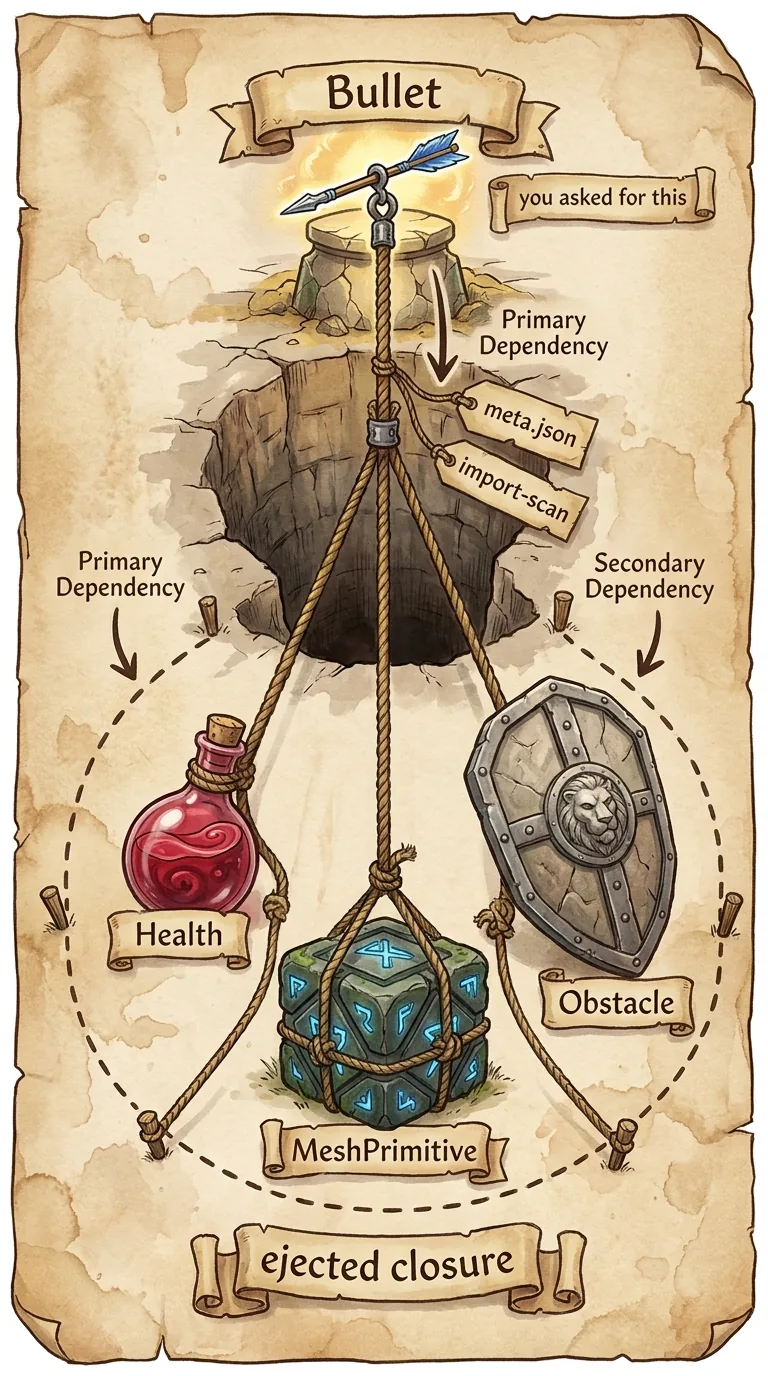
Eject turns one name into four by walking a dependency closure. You start from a seed set — your starting components. Here that is just {Bullet}. What comes back is the seed plus everything reachable from it. The walk is a plain worklist: take a component off the queue, find its direct dependencies, and for any you have not seen before, add them to the result and push them onto the queue to check later. When the queue empties, every transitive dependencySomething you depend on only indirectly — a dependency of one of your dependencies. is in.
The result set is the answer, and it grows. The queue is the work, and it shrinks. A dependency already in the result is never queued a second time, so even a cycle — Bullet needs Health, Health needs Bullet — can't loop forever. Feed it {Bullet} and out comes {Bullet, Health, MeshPrimitive, Obstacle}.
That leaves one question. Where does eject get a component's direct dependencies in the first place? It looks in two places, and it trusts both.
The first is the component's meta.json. Its dependencies list is the marketplace card that declares what the component needs. The second is the code itself: eject scans every file in the component for ../Sibling/ imports and counts each sibling it finds. That two-source design is deliberate. If meta.json is missing or malformed, the import scan is the safety net. A component can get its metadata wrong or forget to list a dependency — but it can't import a sibling unless that import is really there on disk to be read. With both sources feeding the closure, the result is correct even when one of them is wrong.
This is also why your own meta.json dependencies must be honest in the marketplace-ready lesson. This is the tooling that trusts it.
What gets written, and why your copy overrides the package
Drop the flag and run it for real.
Now eject carries out the same plan you read in the dry run. It happens in four steps, and each one is one of the surprises from the opening.
Step 1 copies each folder in the closure into src/components/, tests included. The tests come along on purpose. They describe the contract the component shipped with. So the moment you change a default, they tell you whether you changed the behavior or broke it.
Step 2 is the import rewriteEditing the import paths in a copied file so its references resolve from the file's new location instead of its old one.. It is what lets a partial eject still resolve. A copied file that imports ../Obstacle/ is fine when Obstacle was ejected too. Both folders now sit under src/components/, so the relative path still points at a real file. But a copied file that imports a sibling you did not eject would dangle. So eject retargets that import to @babylonjsmarket/arcade/X, back at the package. You get the components you asked for as editable source. The ones you left behind keep resolving from node_modules. Anything from ecs, viz, or the renderer adapters is left alone. Those always resolve from node_modules.
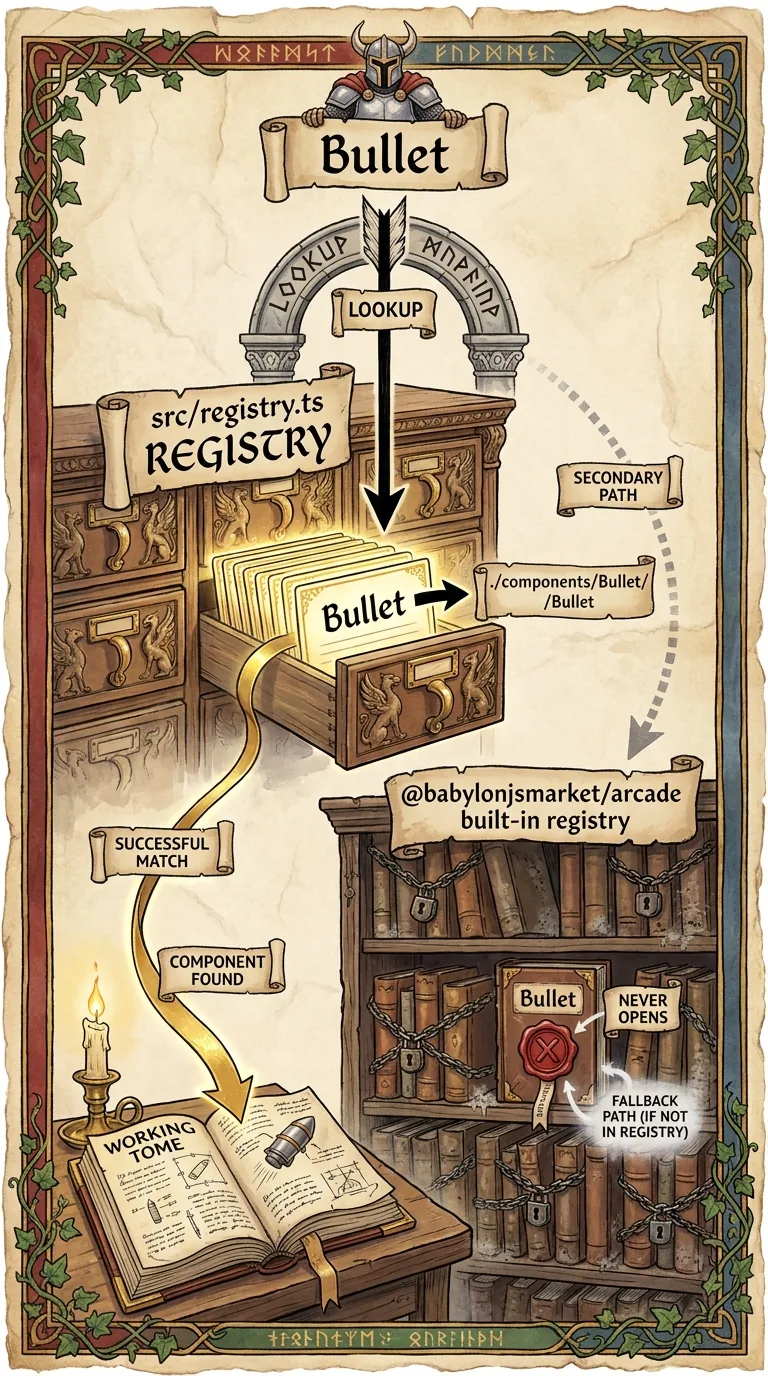
Step 3 is the override. On the current scaffold, it is a no-op by design. The scaffolded src/registry.ts auto-discovers components with import.meta.glob. It globs src/components/ at build time, so a new folder there is registered with no edit. That is why the dry run printed "registry auto-discovers components — no wiring needed." Once your src/components/Bullet/ exists, the project resolves Bullet to it. The package's built-in is still installed, but it is no longer reached. Your copy wins because it is the one the registry now sees.
Step 4 drops a small Claude Code skill into .claude/skills/, so AI tooling already understands the components you just took ownership of.
The three eject modes and the tradeoff
You have seen the named mode. There are three, and they differ only in how the seed set is chosen — the closure and the copy work the same after that. Run arcade eject --help to see them spelled out, alongside the two flags that matter: --all to eject the whole library, and --dry-run to preview the plan without writing.
Bare arcade eject scans your scene and registry for the components your project already uses and seeds from those. That is the natural move from a fresh scaffold. Naming components seeds from exactly those. --all seeds from the whole library. Every mode then runs the same closure, so even --all is just "seed = everything."
Ownership has a cost, and it is worth saying plainly: once a component is yours, package updates no longer flow into your copy. For game code that is usually the right trade. You ejected because you wanted to change behavior the author never planned for. But it means re-running arcade eject Bullet resets your copy to a fresh one from the package. That is how you pick up an upstream fix, and it also overwrites any edits you have not committed yet. So commitSaving a checkpoint of your work with git, so you can come back to it. Edits you haven't committed can be overwritten. your work first — save a checkpoint with git — before you eject. Eject hands the code over to you; it does not sync it.
Try it
Open the project you scaffolded earlier. Pick a built-in it uses. Use Bullet if it fires; otherwise use KeyboardMover, CameraFollow, or Score. Dry-run it first.
Read the plan, then run it without the flag. Open src/components/Bullet/Bullet.core.ts and find the bullet's default speed. The ?? 18 is the shipped value (the ?? means "use data.speed if it's set, otherwise 18"). Raise it to something fast, say 40:
Reload the game and fire. The bullets are faster now, because the game runs your Bullet — the one in src/, with your edit in it. Then run its tests. Tests are small checks that confirm the component still behaves as expected, run here with vitest (npx runs it without a separate install):
A test will probably flag the new default: it still expects the old 18, so it fails. The tests describe the behavior the component shipped with, and you just chose a new one. Update the expectation to 40 and the tests pass — "go green" — now documenting your Bullet. This round trip is the loop you will run constantly: eject, open, change, see it, retest.
Acquiring a catalog component
Eject only reaches components the package already ships. Some catalog components did not ship with it — another member published and merged them. For those, the source comes through acquire, the credit move from the BBS. It also lands as code you own under src/ (a flat src/Components/<Name>.ts, capital C), found by the same registry. The difference is where the bytes come from and what they cost.
Acquire POSTs to /api/library/acquire, and the server does the spending: it draws down your credits, unlocks the component, and grants its dependency components in the same call. The case worth understanding is the failure — what happens when you can't afford it.
When your balance can't cover the component, the server answers with a 402The HTTP status for Payment Required; the acquire endpoint returns it when you lack the credits to unlock a component., HTTP for Payment Required, and the marketplace means it literally. Along with the status it reports two numbers: how many credits you needed and the balance you actually have. Acquire turns that into a plain message — "Need 3 credits, you have 1." — without writing a single file. That is the guarantee: on a 402 the call aborts before it touches your disk. You are never left with a half-acquired component.
So the same dependency-closure idea you watched eject run locally also runs here, just on the server this time: ask for one catalog component and the granted set includes its dependency components too. Whether the source arrives free from the package or paid from the catalog, it lands as code you own under src/, found by the same registry with no wiring. Next you write one.
Next: Make It Marketplace-Ready — shaping a component into the folder the marketplace recognizes, and predicting from the detect rule whether inject sends it to arcade or viz.