
10 minutes
Submit and Track Your Component
TL;DR — Claim the
@handleyour work is published under, thenbjs submit componentsends a copy of your component to the marketplace as a diff payloadThe bundle submit sends: the new files plus the registration patches needed to list the component in the catalog.. Thenbjs submissions(list, show, withdrawPulling a still-pending submission back out of the queue with bjs submissions withdraw.) tracks it from pending, through a curatorThe person who reviews a submission like a pull request — reads the code, runs the test, and merges or returns it with notes.'s review, to mergedThe terminal success state: the component shipped into the catalog and cheddar was awarded.. You dry-run first, follow the pending→reviewing→merged state machineA model where a thing occupies one named state at a time and can only move along defined transitions — here, a submission's lifecycle., read reviewer notesThe written feedback a curator attaches to a submission, visible in bjs submissions show once review starts., and earn cheddarThe marketplace's spendable balance, earned when a submission merges and spent to acquire catalog components. when a merge lands.
Last lesson left Magnet in the exact shape the catalog expects. Now you run bjs submit component Magnet. A second later, your component is off your machine. But open src/components/Magnet/ and it is all still there. Every file is untouched, and your gitThe tool that tracks versions of your files over time, so every change is recorded and nothing is lost. history is intact. So what left? Not your component. A copy of it, shaped like a pull requestThe standard way coders propose changes to a shared codebase: a bundle of edits someone else reads, runs, and either accepts (merges) or sends back with notes. Often shortened to PR.: a list of new files plus the edits that register it in the catalog. The marketplace takes that copy and drops it in a queue. A real person opens it like any other PR. They read the code, run your test, and either merge you into the catalog or send back notes.
You started this course by pulling other people's components into your project. Now your component goes the other way, into the catalog every member browses, and you can follow the whole trip from your terminal.
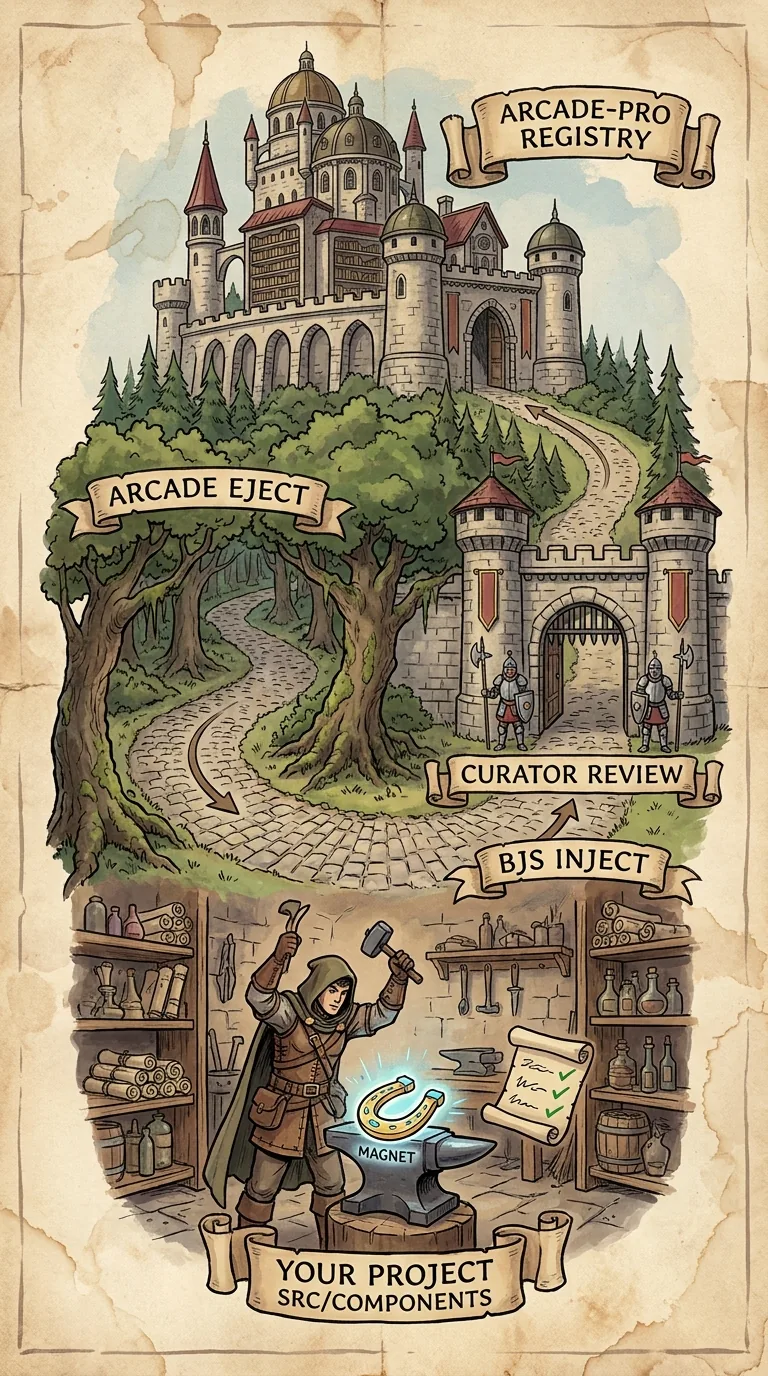
What submit sends to the marketplace
The last lesson left Magnet in the exact marketplace folder shape: Magnet.ts, its test, and a meta.json. Submit does not repackage any of that. It reads the folder, works out where it belongs, and builds a payload — one bundle that carries everything the marketplace needs and nothing tied to your machine.
That payload is a handful of fields, and together they are exactly what crosses the wire. target is an internal routing field — arcade for a gameplay component, viz for debug-panel infrastructure — and it decides where the component files sit in the catalog, not which npm package they ship in. componentNames is what you asked for. files is the source itself. patches are the registration edits that make the catalog aware of it. A version stamp records which CLI built it. And your meta.json rides along as the marketplace card. There is no filesystem path from your machine and no git remote — just those fields, serialized to JSON and sent as a single web request that posts them to the marketplace's submissions endpointA specific URL on a server that accepts requests — here, the marketplace address submit POSTs your submission to.. The server answers with a 201, its way of saying "accepted, created." That is why your source never moves. The bytes that travel are a snapshot, copied into a request body.
Because the submissionOne submitted component (or set) sitting in the marketplace review queue, tracked by a numeric id. is a copy, you can keep working on Magnet the instant you hit enter. The review queue holds a frozen version. Your editor holds the live one.
Claiming a publishing handle for your work
The first time you submitThe bjs command that reads your component folder, bundles it as a diff, and sends it to the marketplace for review. anything, the CLI stops and asks for something it has never needed before:
The catalog has one flat namespaceThe part of a catalog address that says who published something — @yourhandle in @yourhandle/Magnet. for component names, and Magnet is a name several people will think of. A handleThe @name your published components and assets are listed under, claimed once on your first submission and permanent after that. gives every published component an owner in its address, so two members can both ship a Magnet and neither has to rename theirs. Yours is listed as @yourhandle/Magnet; theirs stays @theirhandle/Magnet.
What the handle does not change is what your code is called once it lands in a project. Scene JSON still says "Magnet", and the folder is still src/components/Magnet/. This is the same split npm makes: the registry knows a package as @scope/name, and the code that imports it uses a plain local binding. The handle is an address in the catalog, not a rename of your component.
Downloads read that address loosely. bjs download Magnet still works, and it resolves to the marketplace's own components first — which is why every command in this course has been typing bare names all along. Only when two members publish the same name, and neither is first-party, does the CLI stop and ask which one you meant:
Name the one you want with bjs download @magnet-dev/Magnet and there is nothing to ask. In a script or a CI job, where there is nobody to answer, the CLI prints that same list and exits instead of guessing — a wrong guess spends your cheddar on someone else's code.
Handles are permanent. Once other people's scenes and download scripts reference @yourhandle/Magnet, renaming would break every one of them, so the CLI takes the handle once and never offers to change it. Pick the one you want to be known by.
The checks submit runs on your folder
Submit reads your folder before it builds anything, and says what a curator would say. A missing meta.json stops the run — and on a terminal it offers to write one, filling in the class names, the siblings you import and the events your code emits or listens for, then asking you for the description, category and tags it cannot read off the source.
The rest are warnings, and they do not stop a submission:
That second one is the honest-dependencies rule from the last lesson, now checked mechanically. The third matters because the "Listens to" and "Talks to" lists on your component's page are built by matching your emits against every other component's listens, and the other way round. An event you forget to declare is a connection the catalog cannot draw.
Dry-run before you submit
Before sending anything for real, run submit with --dry-run. It does everything up to the POST. It finds your files, resolves the target, and builds the plan. Then it stops and prints the plan:
That last summary line counts the very same files and patches the real submit would send — a dry runRunning submit with --dry-run, which prints the file-and-patch plan and submits nothing. and a live submit build the identical plan; only the POST is held back. Read the plan like a list of changes, line by line, top to bottom. Check that these are the files you meant to share, and that no scratch experiment snuck in. Check that the test is listed. If it is not, the folder is not shaped the way you think, and a curator will bounce it. Check the target. A gameplay component reads arcade; viz on something that is not a debug panel means the detector read a signal you did not intend.
When the plan looks clean, drop the flag and send it for real:
Two flags cover the cases the default misses. Name two components that really depend on each other and they travel as one submission, reviewed and landed together. --source <path> points submit at a folder outside src/components/<Name>/, but only for the source files — it still reads meta.json from src/components/<Name>/meta.json no matter what --source says, so keep a copy there. Run bjs submit component --help to see them all.
The id and status submit prints
A successful submit prints two things, and the rest of this lesson lives on the first one. Your terminal shows:
The id is your submission's name everywhere from now on. It names it in the terminal, on the site, and in a curator's queue. The status starts at pending. That means it is in the queue, waiting, and no curator has opened it yet. The URL is the same submission on the website, if you would rather watch it there. But you do not have to leave the terminal.
Tracking with bjs submissions
Everything you have ever submitted lives under one command. Its three subcommands are the whole tracking surface: list, show, and withdraw.
Bare bjs submissions, with no subcommand, falls through to list. So it prints the table of everything you have sent:
The --status option filters that list to one state. bjs submissions list --status pending shows only what is still in flight. --limit raises the twenty-row default. --json lives on every subcommand, for piping instead of reading. For the full detail on one submission, hand show its id:
That adds the fields the table leaves out. It shows when it was last updated and which CLI version built it. Once a curator has written some, it also shows the reviewer notes.
The states a submission moves through
The status column is a state machine. A submission sits in exactly one state. Each state allows exactly one move:
| State | What it means | Your one move |
|---|---|---|
pending | In the queue, untouched | Withdraw it |
reviewing | A curator has it open | Wait for the result |
merged | Shipped into the catalog | Acquire it like any component |
rejected | Returned with notes | Fix, submit again |
withdrawn | You pulled it back | Inject a fresh one |
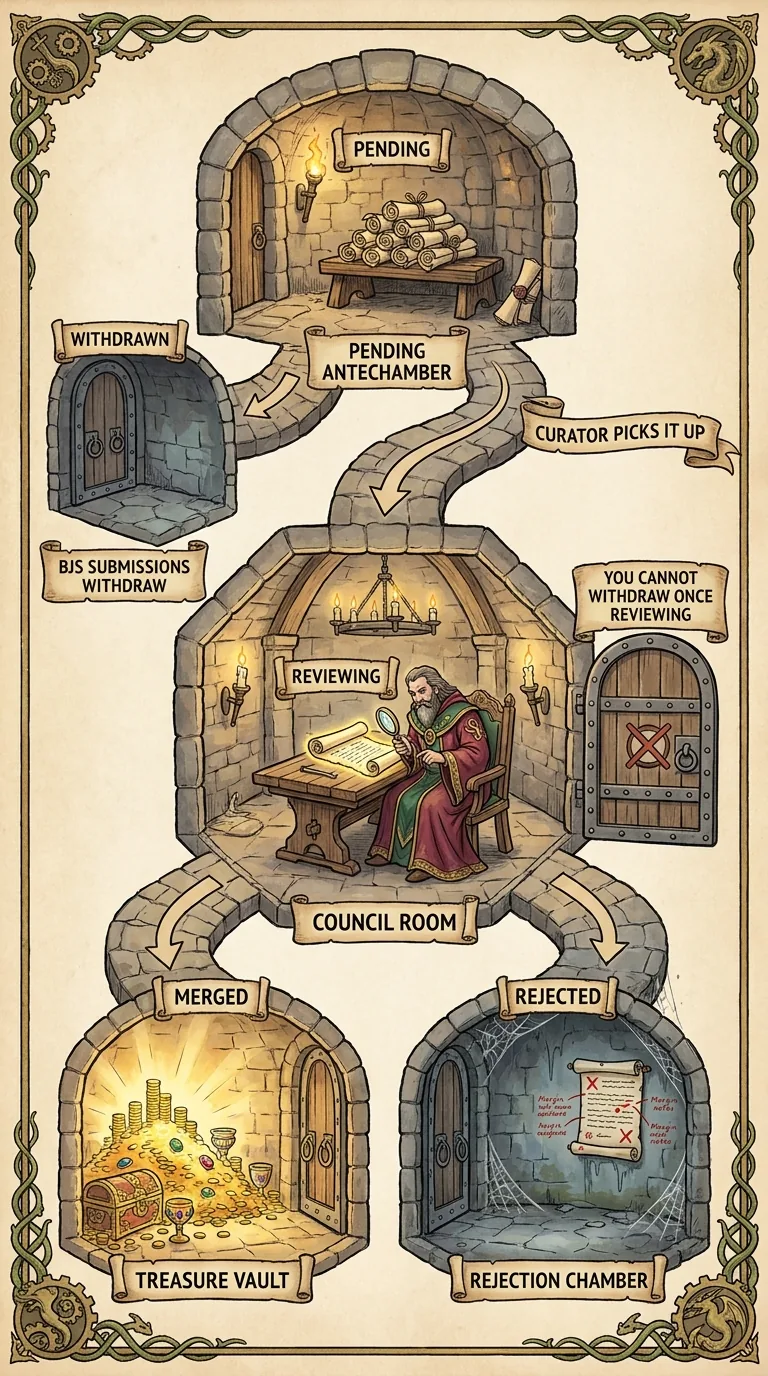
The CLI enforces that table. While a submission is pending, you can pull it back; the moment a curator starts reviewing, you can no longer withdraw it. bjs submissions withdraw puts two guards between you and a mistake. First it asks you to confirm — Withdraw submission 142? (y/N) — so you can't pull one by accident; pass -y to skip that prompt. Then the server has the final say. If the submission already moved past pending, the request comes back as a 409 conflict, and the CLI turns that into a plain-English line: Already in review or finalized — can't withdraw. A 409 is one of a few HTTP status codes the server can return here; an expired session shows up as 401 with a nudge to run bjs login, an unknown id as 404, each with its own one-line message. So withdrawal is for the bug you spot minutes after submitting. Withdraw, fix, and submit again. Once a curator is reading, you let the review play out.
Reading reviewer notes and resubmitting
Say Magnet comes back rejected. Run bjs submissions show 142. The detail view now carries the reviewer notes a curator wrote while running your code:
The specifics here come from earlier ECS and component courses (Vector3, per-frame allocation, _temp reuse). At this stage, what matters is the shape of the feedback, not every term in it. A rejection is not a final no. It is a short list: a couple of concrete fixes and a missing test, about an afternoon's work, with a clear invitation to resubmit. Make the fixes in your project and submit again. The copy in the queue is frozen, and your source never left. The new submission gets a new id and rejoins the queue with no penalty. Most components that merge take a round or two of this. Feedback from someone who actually ran your code is some of the most useful you will get.
Merging awards cheddar and lists your component
One morning the row has changed:
Merging awards cheddar. That is the same balance you spend to acquire catalog components, now flowing the other way. Show a merged submission and the CLI calls the amount out directly, on a line at the top of the detail view.
And Magnet is in the catalog. Open bjs bbs into the component listings and it sits there beside components written by people who have done this for years. It carries the description from its meta.json, with a price in cheddar next to it. Somewhere down the line, a member you have never met browses that catalog and spends cheddar to acquire Magnet. Your source lands in their src/components/: the pure logic, your comments, and your test. There they start reshaping it for a game you will never see.
You have now walked the loop in both directions: community code came into your project, and your code went out into the community. The marketplace you started browsing has you in it.