
6 minutes
Building for Production
TL;DR: One
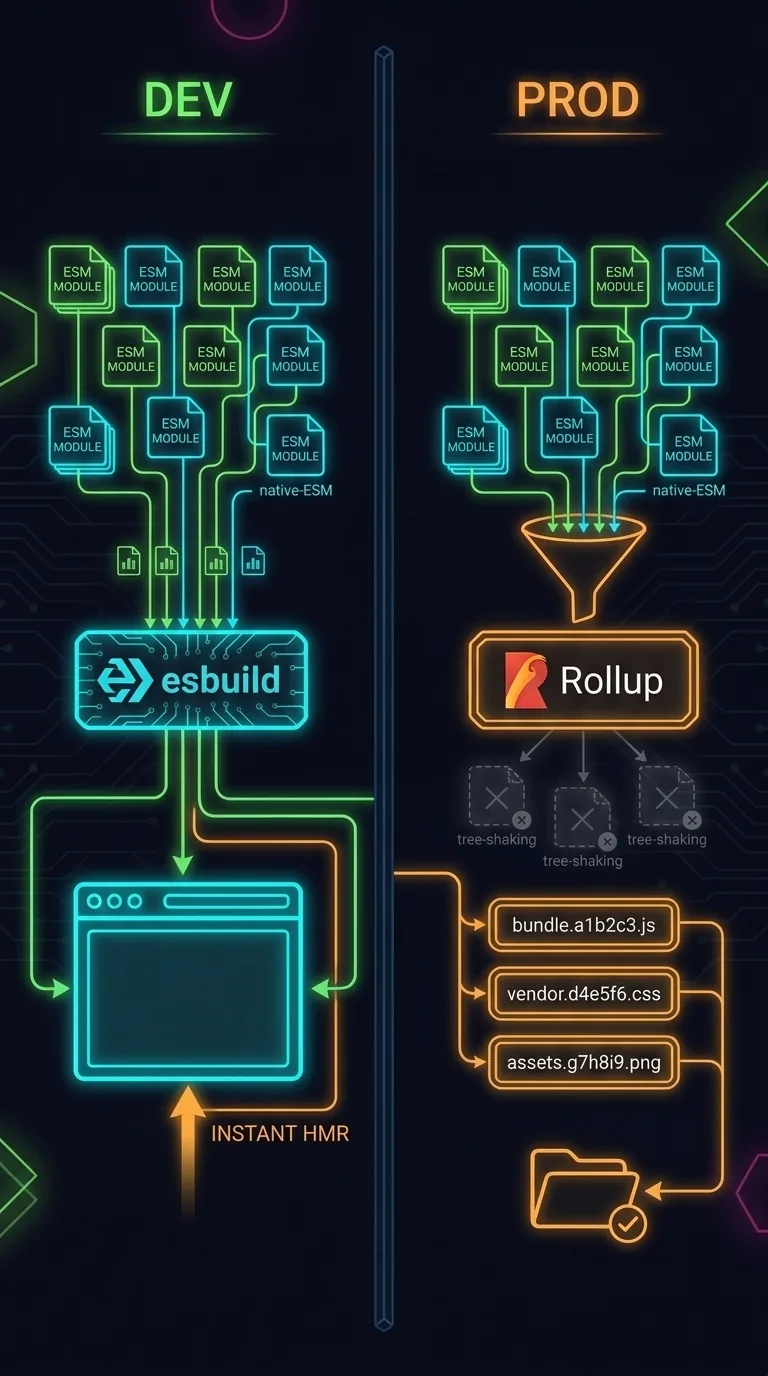
vitecommand does two opposite jobs. In dev, esbuildThe fast Go-based transpiler Vite uses in dev to strip TypeScript types and serve files the instant the browser asks for them. serves your modules unbundled so HMRHot Module Replacement, the dev feature that swaps the one module you changed into the running page without a full reload. is instant. For production, RollupThe bundler Vite runs for the production build, stitching your modules into a few optimized files. bundles, tree-shakes, and content-hashes a leandist/. We also cover how a published package ships its.jsnext to the.d.tsthat powers your editor's autocompleteThe editor feature that suggests method and property names as you type, driven by the types it can see.. Skip if you already know why dev serves unbundled modules whilenpm run buildbundles and tree-shakes, and how.d.tsfiles feed autocomplete.
Last lesson you read the framework's real source: the 640-slot event pool, and why it never allocates a single object in a frame. Back in The Dev Loop, npm run dev updated the page the moment you saved. That same vite command also packages your code for a stranger's phone. Two very different jobs, handled by two different tools. This lesson covers both, and one thing left over from Lesson 2: a package you npm installed taught your editor to autocomplete code you never wrote.
How HMR keeps the loop fast
Your project isn't one giant file. It's a pile of small files, modules, and each one imports what it needs from the others. When you save, Vite doesn't rebuild the whole app. It finds the one moduleA single source file that imports what it needs and exports what others use; your app is a graph of them. that changed and sends only that module to the browser. The browser swaps it in place. The page updates in milliseconds, and you keep your scroll position and any text you'd typed. This is Hot Module Replacement, or HMR.
The loop between saving and seeing the result is a couple hundred milliseconds wide.
Why the production build uses a different tool
In dev, Vite serves your source files mostly as-is. It uses the browser's native ES module system, and a fast transpiler called esbuild strips the TypeScript types on the fly. Vite tunes dev around your feedback loop. Files transform only when the browser asks for them, so startup is instant and HMR is instant.
But hundreds of tiny files is wrong for a real user. They shouldn't have to download hundreds of files, or any code the app never runs. So npm run build hands the bundling to Rollup. Rollup's job is the opposite of esbuild's: a fast download and run for the end user. The two builds are tuned for two different people, and Rollup transforms everything up front, once.
What Rollup does that esbuild doesn't
Three jobs turn your pile of modules into something small enough to ship.
Bundling stitches your modules into a few files. Now the browser makes a handful of requests instead of hundreds. Tree-shaking follows your imports and drops any code nothing imports. Use three of a library's fifty functions, and the other forty-seven never reach your bundleThe output of stitching many source modules together into one file (or a few) the browser downloads at once.. The name comes from shaking dead leaves off a tree. Code-splitting breaks the result into separate chunks. Each chunkOne of the separate files code-splitting produces, loaded on demand rather than all at startup. loads only when a page needs it. Code-splitting also stamps each file's name with a content hashA short fingerprint of a file's contents stamped into its name, so the name changes only when the contents do. of what's inside it. When the contents change, the name changes. So a browser re-downloads a file only when it's actually different.
The output lands in dist/, a folder you can read line by line now. On each line, that second and smaller number (gzip: 15.1 kB) is how small the file gets after it's compressed for download. A vendor chunk holds the outside library code, split away from your own. It's split here because it's loaded through a dynamic import(). Now a browser can cache it on its own and skip re-downloading it when only your code changes. The hashed names, the split chunks, and the smaller sizes are all Rollup deciding what a stranger should download: esbuild handles the dev loop, Rollup handles the shipped build.
How a typed library ships .js and .d.ts
A published package like @babylonjsmarket/ecs ships a dist/ too. But it's not the bundled, tree-shaken, hashed kind an app build produces. A library leaves bundling to the app that installs it. So it ships its modules unbundled, one .js per source file, paired with a description of their types. Two kinds of files sit side by side.
| File | What it carries | Job |
|---|---|---|
.js | the actual transpiled code | runs in the browser |
.d.ts | a pure description of the shapes — what classes exist, their methods, arguments, return types | tells your editor the types |
The .d.ts files carry no logic. They're the shape of the library written down: the same interface and class signatures you've read all course, with the implementation peeled off. When you npm install @babylonjsmarket/ecs and import { World }, you pull in the built JavaScript to run. The declaration files are why your editor autocompleted method names and underlined mistakes before you ran anything.
Every red squiggle in Lesson 2, and every method name the editor offered as you typed world., came from a .d.ts file. The framework's authors shipped those files so your editor could see the shapes without ever running the code.
Now go read the source
Open the @babylonjsmarket/ecs source and read it. These are the files that dist/ was built from. Read to recognise the shapes rather than memorise them: the type aliases, the abstract base class, the generic emit, the Map<string, Set<EventCallback>>, the 640-slot pool of pre-allocated reusable objects. You have met every one of them already.
Up to Speed with Arcade ECS turns this same source into playable games: entities, components, systems, the World, and scenes as data. It picks up where the language and the runtime leave off.
References
- Vite: Building for Production: the Rollup production build, tree-shakingDropping any code nothing imports from the final bundle, named for shaking dead leaves off a tree., and code-splittingBreaking the bundle into separate chunks that load only when the page actually needs them..
- Rollup: the production bundler.
- MDN on JavaScript modules: the ES modules both builds rely on.
- npm and package.json: how a published package describes its files and types.