
8 minutes
Garbage Collection
TL;DR — Every object you make becomes garbage. Later, the collector has to clean it up. That cleanup is a stop-the-world pauseA halt where the garbage collector freezes all your code while it decides which objects are still in use., and it can push a frame past 16.67ms and drop it. So the framework makes no new objects on the hot path. It reuses them instead, through a pool (the real 640-slot EventBusThe @babylonjsmarket/ecs class that carries messages between parts of a game; it reuses a pool of event objects instead of allocating one per send. ring) and a reused scratch object. Skip this if you already avoid per-frame allocationReserving a fresh chunk of memory for a new object — what happens every time you write an object literal, an array, or new. without thinking and know why pooling beats fighting the GCShort for garbage collection, or the program inside the JavaScript engine that performs it.. Otherwise, this is why every
_tempand object poolA fixed set of objects built once at startup, then handed out and recycled forever so the loop allocates nothing. in the framework's source exists.
Last lesson ended with a warning, but it never gave the threat a name. You had just learned the frame budget. At 60 frames per second, your game gets 16.67 milliseconds to do all its work. Then the screen redraws, ready or not. You also learned the biggest way to blow that budget. It isn't heavy math. It's wasting memory. And one memory problem is worse than the rest. It runs on its own schedule. It stops your game in the middle of a frame. You never wrote a single line of it.
This lesson gives it a name. A program runs alongside your code and cleans up after you. It throws out the objects you made and then stopped using. Once you see how it works, one odd choice in this framework's source will make sense. The framework builds exactly 640 event objects when it starts up. Then it refuses to make a new one in the loop that runs every frame.
How JavaScript frees memory: the garbage collector
In JavaScript, you never clean up your own memory. Some languages make you free every object by hand. JavaScript does not. You make objects whenever you want. When you stop using them, they go away on their own.
This isn't magic. A program runs quietly inside the JavaScript engine. It's called the garbage collector, or GC for short. Its job is to find objects that nothing points at anymore. Then it takes back the memory they used. You never call it or schedule it. It wakes up on its own when there is enough garbage to clean. You don't control when that happens. And that is where the trouble hides.
Why the GC pauses your game
Before it cleans up, the GC has to sort out which objects are still in use. It can't do this while your code runs. Your code might grab an object the moment the GC decides to throw it away. So the GC does the only safe thing. It stops your code from running while it decides. This is a stop-the-world pause, and the name is exact. Your game logic does not slow down. It stops in the middle of a frame until the cleanup is done.
Most pauses are tiny. But compare one to the frame budget:
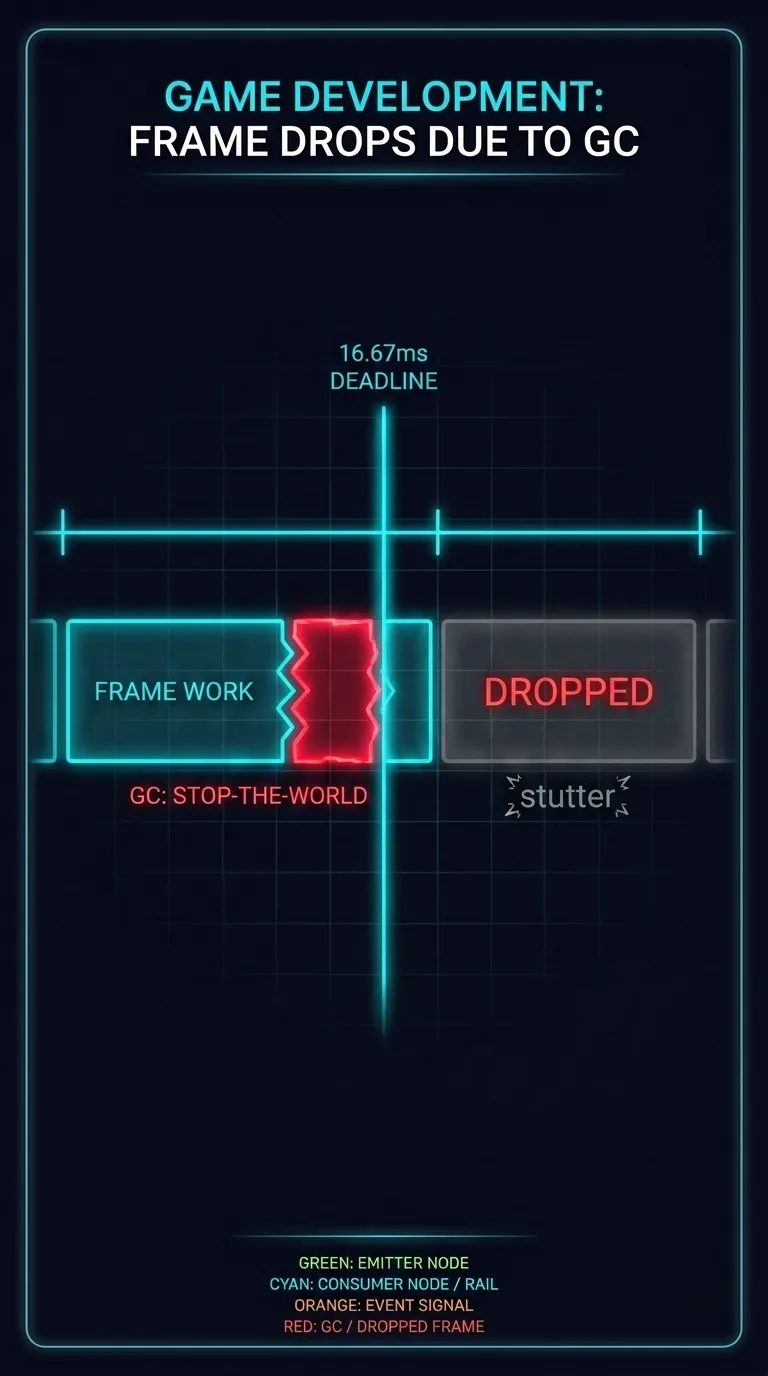
A frame gives you 16.67ms. A GC pause can push one frame past that deadline. Even a tiny bit too far means the frame doesn't finish in time. The screen shows the old picture again. That's a dropped frameA frame whose work missed the 16.67ms deadline, so the screen redraws the previous picture and the player feels a stutter.. The player feels the stutter, even if they can't say what happened. You didn't write that pause. But you caused it, by making garbage.
Where the garbage comes from
Every object you create turns into garbage the moment you stop pointing at it. And in JavaScript, you create objects all the time:
One object is nothing to worry about. But games make objects in hot loops. A hot loopCode that runs thousands of times per frame, where even a tiny per-iteration cost multiplies into real time. is code that runs thousands of times per frame. Picture a fountain of sparks. It spawns about 200 particles every frame. Each spark is a new object that holds its position and velocity. Now do the math against the budget:
Twelve thousand new objects a second. Each one becomes garbage a moment later, when its spark fades. And the code looks harmless. There's no slow loop and no heavy math. It's only the { character, repeated twelve thousand times a second. But every one of those objects becomes work for the garbage collector later.
The fix: stop making garbage
The fix is simple, but it takes discipline. In code that runs every frame, don't make new objects. Reuse the ones you already have. If you make no garbage, the GC has nothing to collect. So it never pauses because of your code. You don't make the collector faster. You just leave it nothing to do.
Same sparks, same physics. Only the way you handle memory changes between these two columns:
| Create-and-destroy | Pooled / reused | |
|---|---|---|
| Objects made per frame | 200 (one per spark) | 0 — slots are recycled |
| Allocations per second | 12,000 | a fixed set built once at startup |
| Feeds the garbage collector | constantly | never, on the hot path |
| GC pauses | wake often, run longer | nothing to collect, no pause |
| Frame stability | risks a stutter past 16.67ms | steady — no surprise pause to overrun the budget |
This framework does it two ways. Both are real code you can read. Let's start with the first one.
Pattern one: the object pool
An object pool is a set of objects you build once. Then you hand them out and reuse them forever. Think of paper cups versus real glasses at a party. Paper cups mean a new cup for every drink and a big pile of trash by the end. Glasses mean a fixed set that you wash and use again.
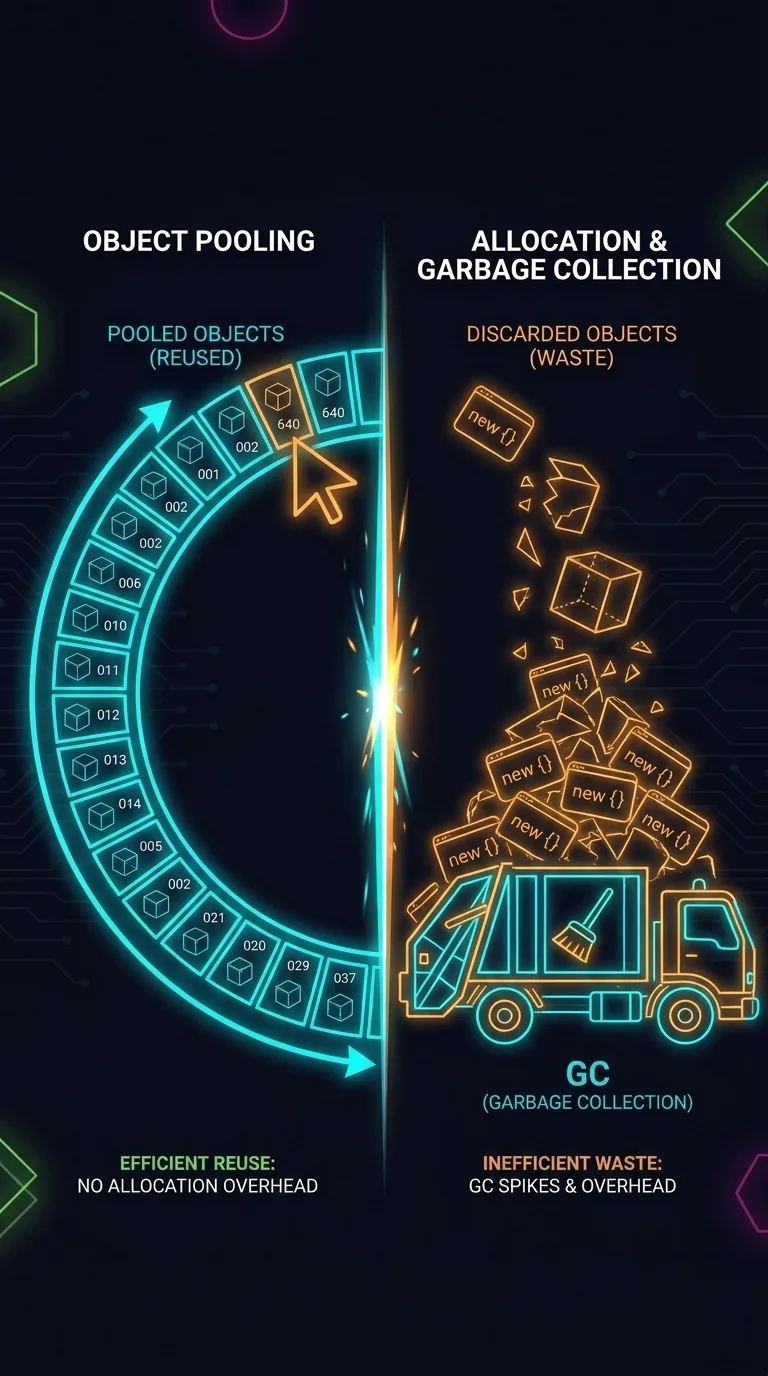
The framework's EventBus works like the glasses. It lets different parts of a game talk by sending small messages called events. It reuses one tiny shape: an event with a type and an optional payload.
A simple bus would new one of those every time something fired an event. Each one would become garbage the instant it was delivered. This bus does something else. Open the file, and the first thing you see is the pool, built full before a single frame runs:
Read it from top to bottom. At startup, once, when the game boots, the loop fills an array with 640 empty event objects. That array holds every event object the bus will ever use. No matter how many thousands of events fly around each second, it never makes a new one.
getPooledEvent is how the bus hands one out. Call it with a type and some data. It doesn't new anything. It grabs the slot at eventPoolIndex, moves the index forward, and overwrites that slot's type and data in place. Then it returns it. The key part is (eventPoolIndex + 1) % EVENT_POOL_SIZE. That % is moduloThe % operator, which gives the remainder of a division; (i + 1) % 640 wraps an index back to 0 when it reaches 640., the remainder after division. So when the index reaches 640, it wraps back to 0. The pool is a ring bufferA fixed-size array used as if its end connected back to its start, so the next slot after the last is the first again.. After the last slot comes the first slot again. Each slot gets overwritten and reused in place.
Here's a detail most readers miss. The common emit never touches the pool at all. emit checks wildcardListeners.size. That's the number of listeners subscribed to *, meaning every event. Usually there are none. In that case, emit takes a fast path. It passes the data straight to each callback and never builds an event wrapper. So it makes no garbage, even without the pool. The pool is for the other case. A wildcard listener gets the whole { type, data } object, and that wrapper has to come from somewhere. The 640-slot ring keeps that case allocation-free too.
The result is zero allocation on either path. The busiest code in the framework makes no garbage. So the GC never wakes up because of it. Why 640? Dispatch is synchronous. Each callback runs and returns before the next event goes out. So speed alone can never run out of slots. The extra room guards against two cases. One is a wildcard listener that holds onto its event object across later emits. The other is an emit chain that calls emit again and hands out several slots before the first is done. 640 is big enough to cover both, and small enough to build instantly at boot.
Pattern two: the reused temporary
The second pattern is the same idea, shrunk down to a single object. A vectorA point or direction in 3D space stored as three numbers — x, y, and z. stores a point or direction in 3D space as three numbers: x, y, and z. Game math uses them constantly. The framework holds one as a plain Vec3 tuple, [x, y, z]. The rendering engine has its own Vector3 type for the same thing. The simple, wasteful way makes a fresh vector for every step of the math. (onUpdate is the method the framework calls every frame. dt is the time since the last frame. An entity is one game object the system is updating: a spark, an enemy, or a player.)
A few hundred entities at 60fps means thousands of throwaway vectors a second. It's the same spark problem in a new form. The fix is to keep one scratch vector, built once and reused each time through the loop. By convention it's named _tempSomething. Real components often carry several, like _tempMeshPos and _tempDir.
One vector gets overwritten thousands of times instead of thrown away thousands of times. It's the pool from the last section, but with a size of one. This is a reused temporaryA single scratch object built once and overwritten each iteration instead of allocating a fresh one — an object pool of size one.. (Real components never import a renderer type like Babylon's Vector3 into a System. They use a plain Vec3 tuple and reach the engine through an adapter. That keeps the scratch object allocation-free and engine-agnostic.)
Why the browser's own event system was 25× slower
Last lesson, the framework's EventBus beat the browser's own built-in event system by about 25×. That system uses CustomEvent and dispatchEvent, and it's written in native C++. So the gap has nothing to do with the language. dispatchEvent needs a fresh event object on every call, and each one becomes garbage the instant it's delivered. The framework's bus pulls a slot from that ring and makes nothing new.
| Per event fired | dispatchEvent (browser) | Framework EventBus |
|---|---|---|
| Object per call | a fresh CustomEvent — required | reuses a pooled slot |
| Reuse the same object | no path to; build a new one each fire | overwrites type / data in place |
| Garbage produced | one allocation every call | none |
| Relative speed | baseline | ~25× faster |
The 25× isn't a faster algorithm. Allocation is the biggest reason. Every dispatchEvent builds one event object that the bus never makes. But it isn't the only reason. dispatchEvent also walks the DOM's capture and bubble phases up the ancestor chain. It retargets the event and crosses the boundary from JavaScript to C++ on a real EventTarget. The bus just does a Map.get and a callback loop. Stop allocating on the hot path and you remove the biggest cost. Skipping the DOM work removes the rest.
When allocation matters: only in the hot loop
The whole lesson fits in one line. In code that runs every frame, allocation is the enemy. Reuse objects instead of making new ones.
None of this applies to setup code, menus, or the level loader. There you can make all the objects you want. The GC handles it, and no one notices. The strict rule belongs to the hot loop alone. And that explains the strange number from the start of the lesson. The 640-object pool isn't trivia. It comes straight from the 16.67ms budget in the last lesson. A frame that small can't afford a stop-the-world pause. So the busiest code in the framework is built to never cause one.
References
- MDN — Memory management — how JS allocates and garbage-collects.
- V8 blog — Jank Busters — GC pauses and frame drops, from the engine team.
- MDN — Games — game optimization techniques, including reuse over allocation.
Next: Building for Production — Vite's production build, and reading the real framework source now that you get why it's shaped this way.