
7 minutes
What a Computer Can Do in 16 Milliseconds
TL;DR — At 60fpsSixty frames per second; a deadline of one new picture every sixtieth of a second., each frame gets 16.67ms. Inside that time, reading memory costs about 100x more than doing math. So the way you use memory, not how much you compute, is usually what breaks the budget. Skip this if you already know the frame budgetThe fixed slice of time one frame gets — at 60fps, about 16.67ms for input, logic, physics, and rendering combined. and how much slower a cache missNeeding a value that wasn't in cache, so the CPU walks out to RAM and waits — often costing more than the math it was about to do. is than math. If not, lesson 6 on garbage collection builds right on this idea.
Last lesson, Generics and Interfaces, you learned to read Map<string, Set<EventCallback>> like a plain sentence. You also swapped one renderer for another in a single typed line. That finished the language lessons. Every one of them was about correctness: catching your typo before the game runs. But correctness says nothing about speed. This lesson goes under the syntax to the machine itself. We look at how much it can really do before the screen has to update.
Here's the thing nobody tells beginners. The computer is incredibly fast, and you can still run out of time. Once you see why, a whole group of "why is my game stuttering?" problems stops being a mystery.
The frame budget: 16.67 milliseconds
"60 frames per second" is really a deadline, and it's a tough one. Sixty frames in one second means one new frame every:
(Anything after // on a line is a comment. It's a note for humans, and the computer ignores it.)
Sixteen and two-thirds milliseconds. That's the whole budget for everything between one picture and the next:
- reading the player's input (did they press a key? move the mouse?)
- running the game logic (score, AI decisions, spawning new things into the world, state machines)
- stepping the physics (gravity, collisions, things bouncing off each other)
- doing the rendering (turning your world into pixels on the screen)
All of it, sixty times a second. A web click handler only runs when the user does something. A game is different. It redoes this whole list every frame, even when the screen sits still. The mix changes from game to game, but rendering takes the biggest share:
| Frame rate | Budget per frame | What has to fit in it |
|---|---|---|
| 60 fps | 16.67 ms | input + game logic + physics + rendering — all of it |
| 30 fps | 33.33 ms | same four jobs, double the room, visibly heavier motion |
| 120 fps | 8.33 ms | same four jobs, half the room |
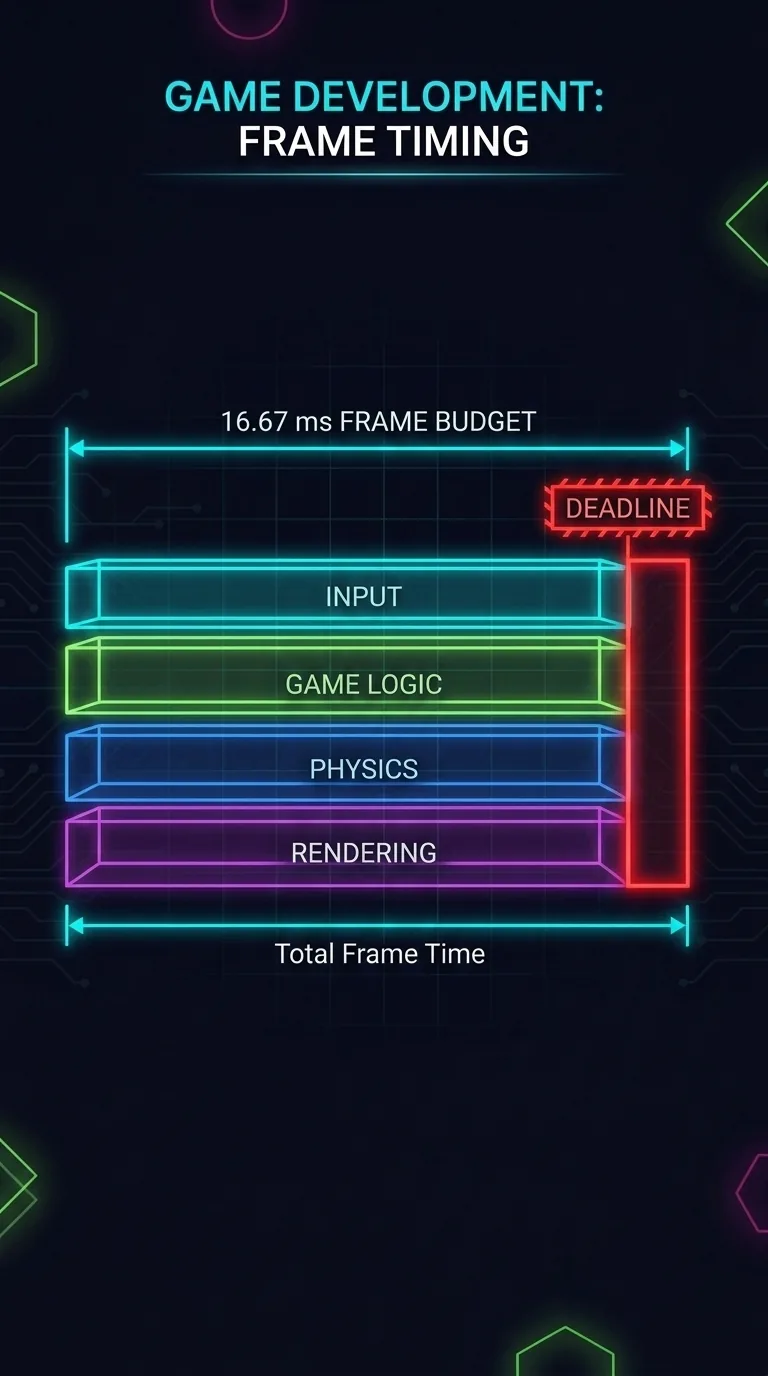
Miss it, so a frame takes 20 ms instead of 16, and the player sees it. We call that jankA visible stutter caused by one frame taking longer than its budget, so the picture skips.: one slow frame that breaks the smooth motion. So keep 16.67 ms in your head for the rest of this lesson.
How fast a CPU really is in one frame
How much can the computer really do in those 16 milliseconds? A lot. The CPUThe central processing unit — the chip that does the actual computing. A modern one has several cores, each an independent worker that runs its own stream of operations. is the chip that does the computing. Inside it are a few separate workers called cores. Each coreOne independent processing unit inside the CPU; a chip with several cores can run that many streams of work at once. runs about billions of simple operations per second: adds, comparisons, and moving a value from here to there. That's billions per second, for each core.
That sounds endless, until you remember you only get one sixtieth of a second per frame. Split billions-per-second into 60 slices. Each frame's slice is a large number, but not an infinite one. And rendering is already eating a big chunk of it. What's left for game logic and physics is a real budget you can spend. A loop that does too much, across a few thousand objects sixty times a second, adds up fast.
So far, this is the part you'd expect: big work costs more than small work. Now for the surprise.
Memory is slower than math
Here's the surprising truth at the heart of this lesson:
Not all operations cost the same. The costly part usually isn't the math. It's fetching the data.
We picture the CPU as a calculator, where the hard part is the computing. But for the work games do, the math is cheap. The slow part is memory: getting the numbers you compute on. The "Latency Numbers Every Programmer Should Know" figures come from Google's Jeff Dean and were shared in a gist by Jonas Bonér (jboner). The exact times change with the hardware, but the ratios are the lesson, and they're huge:
| What you're doing | Roughly how long | Relative to L1 |
|---|---|---|
| Read from L1 cacheThe tiny, fastest memory glued right next to the CPU core; reading from it costs about a nanosecond. (the memory glued right next to the core) | ~0.5–1 ns | 1× |
| Read from main memory (RAMMain memory, far larger but roughly a hundred times slower to reach than L1 cache.) | ~100 ns | ~100× slower |
| Read 1 MB sequentially from RAM (in order, which the hardware can stream fast) | ~250 µs | the unit jumps from ns to µs |
The units climb fast. ns means nanosecond, and µs means microsecond. One µs is 1000 ns. So that last row is already a thousand times bigger than the row above it.
Each step down isn't a little slower. It's a whole different scale of slower. Reading a value from L1 cache takes about a nanosecond. Reading it from main memory takes about a hundred, which is roughly 100 times longer. It's the same "read a number" in your code. But the cost differs a hundredfold, depending on where that number happened to be.
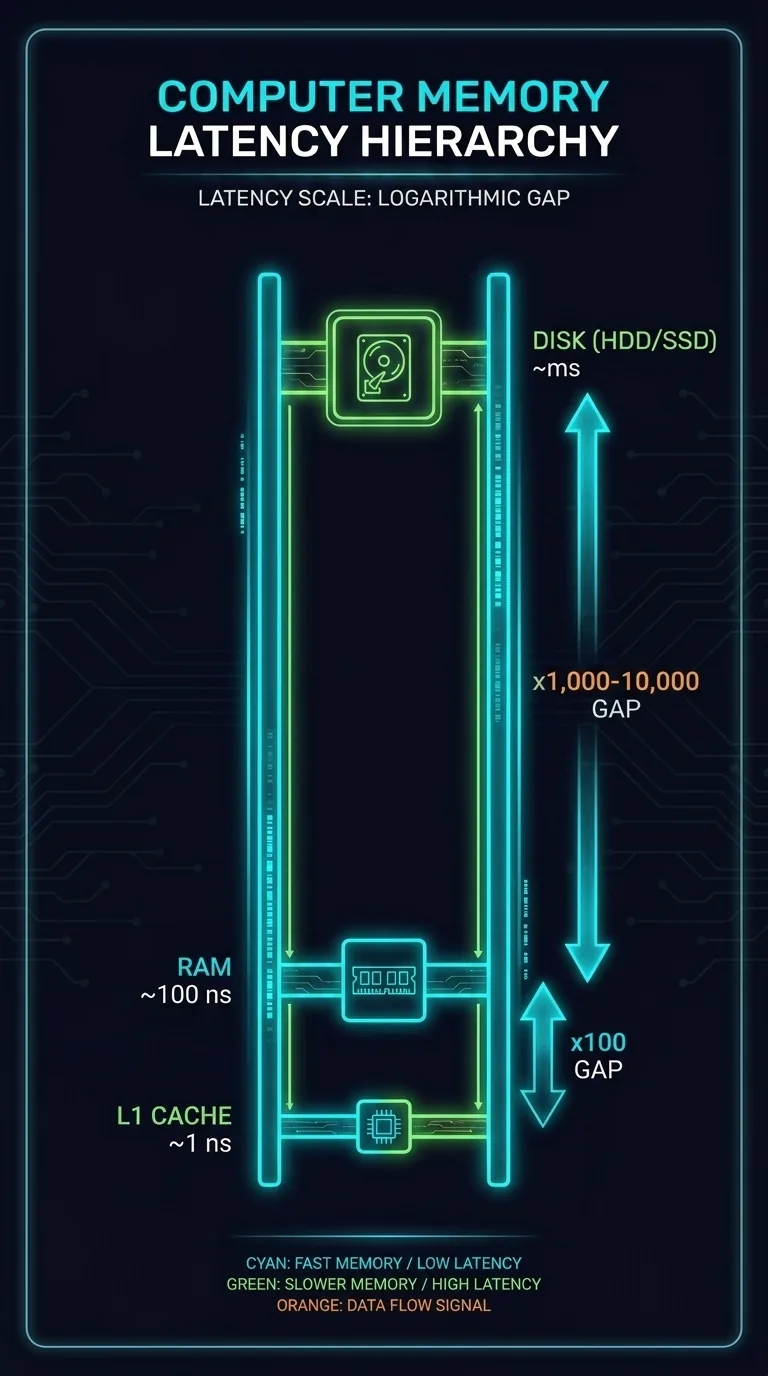
A cache miss happens when you need a number that wasn't nearby, so the CPU goes out to RAM to get it. That can cost 100 times more than the math you were going to do with it. So when a frame runs slow, don't guess "I'm computing too much" first. The real cause is often "I'm making the CPU wait for data."
The biggest and most avoidable trips to memory come from creating new objects. Each new objectA bundle of related data the program creates and has to find room for in memory — a point with x and y, an event with a payload, a player with health and score. needs fresh memory that has to be found, allocated, and later cleaned up. This brings us to the most concrete number in the course.
A real measurement: 50 million vs 2 million emits per second
This framework's EventBusThe @babylonjsmarket/ecs message channel systems emit and listen on; its fast path does a Map lookup and allocates nothing. was benchmarked in Chrome against the browser's built-in tools. These are two ways of "sending an event."
The EventBus fast path is the quick route it normally takes. It does a Map lookup to find who's listening, then calls those listeners. It allocates nothing. That's roughly 50 million emits per second, though the exact number depends on the machine and browser it was measured on. The browser's CustomEvent and dispatchEvent do the same job. But every time, they build a brand-new event object for the payload. That's roughly 2 million per second.
Same idea, but about 25 times apart:
| Path | What it does | Allocates? | Throughput |
|---|---|---|---|
bus.emit (EventBus fast path) | Map lookup, call the listeners | nothing | ~50,000,000 / sec |
dispatchEvent (browser built-in) | builds a fresh event object first | one object per call | ~2,000,000 / sec |
Both do very little work. The built-in path also runs the browser's event-propagation steps (capture, target, bubble). So allocationReserving fresh memory for a new object, the loudest and most avoidable trip to memory in a hot loop. is the largest part of the gap you can avoid, but not the whole gap. The numbers change by machine, but the ~25x ratio holds. And the ratio is the lesson: how you use memory matters more than how much you compute. You read this EventBus's generic emit last lesson. Next lesson, you'll read the 640-object stash it keeps so the fast path never allocates at all.
Scaling the cost up to a whole game
A real game has thousands of entities: bullets, enemies, and particles. Many of them emit events every frame. Do the multiplication:
The same 360,000 emits/sec feels very different by path:
| Path | Throughput | 360,000 emits/sec is… |
|---|---|---|
bus.emit | ~50,000,000 / sec | a comfortable rounding error — you'll never feel it |
dispatchEvent | ~2,000,000 / sec | ~18% of the budget, eaten before you draw a single pixel |
That's the shape of nearly every performance problem in a game. It's not one giant slow thing. It's a small per-operationA single small step the CPU performs — an add, a comparison, moving one value from here to there. cost, multiplied by thousands of objects times sixty frames a second, until it crowds the budget.
The biggest source of that quiet, multiplying cost has a name. It runs on its own schedule. It pauses your game without asking. And you never wrote a line of it. That's where we go next.
References
- Latency Numbers Every Programmer Should Know (jboner gist) — the original latencyHow long the CPU waits for a piece of data to arrive, measured from request to result. table.
- MDN — requestAnimationFrame — the per-frame callback.
- web.dev — Why 60fps? — frame budget and jank.
Next: Garbage Collection — the biggest way a game quietly breaks the budget you just learned about.